Architectural Masterclass: Mastering the D365 F&O Table Permissions Framework (TPF) for Kernel-Level Security

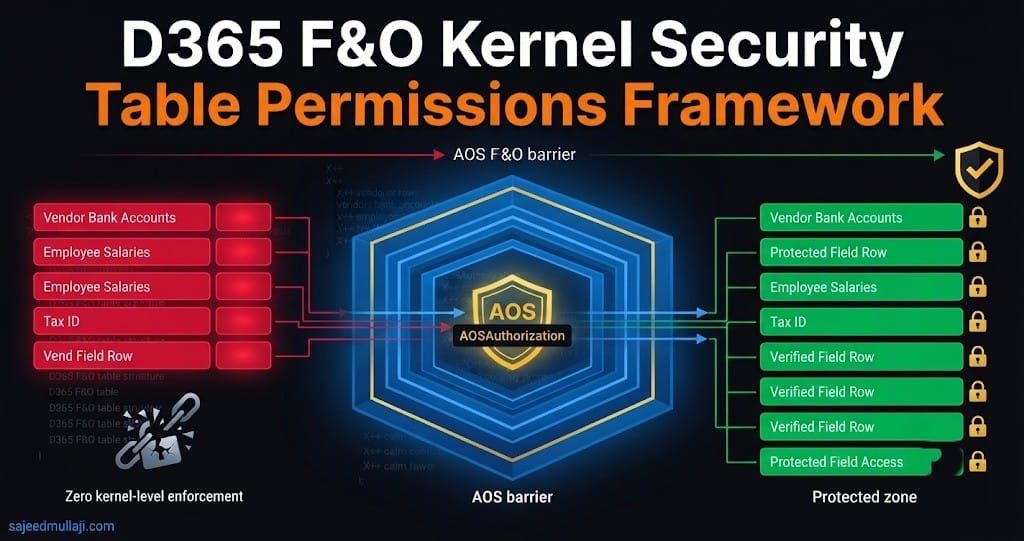
If a compromised service account or a malicious insider bypasses your Dynamics 365 Finance & Operations user interface to directly query sensitive financial tables using custom OData endpoints, Excel integrations, or third-party BI tools, can your application security layer block them before SQL Server executes the command?
In enterprise implementations across the GCC, the UK, and India, failing to implement kernel-level table security leads directly to unmonitored data exfiltration, catastrophic financial fraud, regulatory penalties under GDPR and local data protection laws, and immediate ITGC (IT General Controls) audit failures.
Security through user interface obfuscation is a myth. Governance must be engineered into the application kernel. This architectural masterclass details how to leverage the Table Permissions Framework (TPF) and the AOSAuthorization property to enforce non-negotiable, unbreakable data governance in Dynamics 365 Finance & Operations.
What is the Table Permissions Framework (TPF)?
At a foundational level, D365 F&O security is often misunderstood as simply assigning duties, privileges, and roles to govern menu items, forms, and service operations. This UI-centric approach is vital for user experience, but it leaves backend data access tiers dangerously exposed.
The Table Permissions Framework (TPF) operates at an entirely different layer of the technology stack: The Application Object Server (AOS) Kernel Layer.
TPF functions as an immutable architectural gatekeeper. When any user, batch job, or integration attempts to perform Create, Read, Update, or Delete (CRUD) operations on a table, the AOS kernel intercepts the request before it is translated into a T-SQL query sent to the underlying Azure SQL Database.
If the calling security context does not possess explicit metadata authorization defined via TPF, the kernel rejects the transaction instantly, throwing a runtime security exception.
Why Form-Level Security is Insufficient
- The UI Illusion: A consultant might "hide" the Vendor bank account FastTab on the
VendBankAccountform using personalize or form-control permissions. - The Enterprise Reality: A user with generic read access to vendor data can simply open Excel, use the Dynamics Add-in, and pull
VendBankAccounttable data directly. Alternatively, they can construct a raw OData query. In both scenarios, the form presentation tier is bypassed entirely, rendering UI-level security useless.
The TPF Solution: TPF ties table-level CRUD permissions directly to security privileges via AxTablePermission nodes in the Application Object Tree (AOT). If the active security privilege does not explicitly declare access to that table at the kernel metadata level, the AOS blocks the query regardless of the entry point.
Cross Question 1: A senior architect reading this will ask: "Isn't the extensible data model vulnerable? Meaning, don't custom tables automatically inherit permissions from parent tables like CustTable or VendTable?"Verified Answer: Absolutely not. Inheritance in D365 metadata applies to object-oriented table extensions and fields, but security permissions do not cascade automatically. Every custom table, custom entity, or table extension must have its own explicit TPF and privilege mappings defined.
The Four AOSAuthorization Property Values Explained
Every table in the D365 F&O AOT possesses an AOSAuthorization property. Understanding precisely how this property dictates AOS kernel interception is the hallmark of a senior security architect.
We will use this exact, verified behavior matrix. Note that "Explicit Privilege" refers to an AxTablePermission node assigned to a role/privilege.
| AOSAuthorization Value | Operations Requiring Explicit Privilege (AxTablePermission) | Operations Open / Unrestricted (If Unassigned in Privilege) | Primary Enterprise Use Case |
| None | None | Create, Read, Update, Delete | Staging tables, temporary working tables, non-sensitive parameters where high throughput overrides security requirements. |
| CreateDelete | Create (Insert), Delete | Read, Update | Transactional staging tables where audit trails require locking down row insertion and purging, but general reading and editing of existing records remains open. |
| UpdateDelete | Update, Delete | Read, Create (Insert) | Shared enterprise reference data where departments need visibility (Read) and ability to add new records (Create), but modification of existing records is restricted. |
| Full | Create, Read, Update, Delete (All operations locked) | None | High-risk financial master data: vendor bank accounts, payroll registers, ledger balances, PII tables. Nothing works without explicit assignment. |
How to Configure AOSAuthorization in Visual Studio (AOT)
TPF is a static, compile-time configuration evaluated by the AOS kernel. It cannot be altered dynamically via X++ class extensions.
Prerequisites
- Developer Environment: Configuring TPF requires a Tier 1 Development VM with Visual Studio and access to the Application Object Tree (AOT).
Exact Configuration Steps
- Open Visual Studio and connect to your D365 F&O project.
- Locate the target table (e.g.,
VendBankAccountin the Application Suite) or create a table extension (VendBankAccount.SecurityExtension) in your custom model. - Right-click the table/extension element and select Properties.
- Navigate to the AOSAuthorization property dropdown.
- Select your required security enforcement level (
None,CreateDelete,UpdateDelete, orFull).
The Vital Second Half: Privilege Mapping
Crucial Architectural Note: Setting the property to Full does nothing by itself. It merely tells the kernel to look for permission. You must create a Security Privilege in the AOT and add an AxTablePermission node granting access to that specific table. If the user does not have that privilege assigned, the kernel locks them out.
Real-World Scenario: Securing Vendor Bank Accounts
Consider a multinational enterprise environment operating in regions like the GCC, UK, and India, processing high volumes of vendor payments.
- The Risk: Unauthorized Accounts Payable clerks, or compromised service accounts, attempt to alter vendor bank routing numbers (
VendBankAccount) to facilitate internal fraud. Standard UI security is easily bypassed via Excel or OData. - The Architecture Solution: Set the
AOSAuthorizationproperty on theVendBankAccounttable extension to Full. - The Privilege Mapping: Create a new Security Privilege named
secureVendorBankEditPrivilege. Inside its Data Permissions node, addVendBankAccountwith Access set toFull(Create: Yes, Read: Yes, Update: Yes, Delete: Yes). - Governance: Assign this privilege only to authorized Finance Controllers or Treasury Managers.
The Result: When an unauthorized AP clerk queries VendBankAccount via any interface (form, API, integration), the AOS kernel evaluates their security token against the metadata map, identifies that they lack secureVendorBankEditPrivilege, and aborts execution instantly.
Cross Question 2: An IT Audit Director asks, "How do we prevent a functional security administrator from simply adding the required privilege to an unauthorized user's role after go-live?"Verified Answer: This highlights a critical segregation of duties (SoD) control. We implement strict workflow-based change management in Azure DevOps. Moving security privilege assignments to production requires release pipeline approval, not just functional setup access in the D365 client. Furthermore, Azure Monitor alerts trigger whenever the secureVendorBankEditPrivilege is assigned to a new role.
Complete X++ Code Walkthrough & Exception Handling
Senior architects must know how to verify TPF enforcement programmatically and handle the resulting kernel exceptions gracefully in custom services.
1. Runtime Metadata Inspection Diagnostic Job
To audit your existing environment programmatically and ensure sensitive custom tables are not left exposed with AOSAuthorization::None, use the DictTable kernel class.
Code snippet
class TPFTableAuditDiagnostic
{
    public static void auditTableAuthorization(TableName _tableName)
    {
        // Retrieve table ID from name
        TableId tableId = tableName2Id(_tableName);

        if (!tableId)
        {
            error(strFmt('Table %1 does not exist in AOT.', _tableName));
            return;
        }

        DictTable dictTable = new DictTable(tableId);

        if (dictTable)
        {
            AOSAuthorization authLevel = dictTable.aosAuthorization();

            // Log current state to Infolog
            info(strFmt('Table: %1 | AOT AOSAuthorization Level: %2', _tableName, enum2Str(authLevel)));

            // Compliance check
            if (authLevel == AOSAuthorization::None)
            {
                warning(strFmt('COMPLIANCE ALERT: Table %1 has no kernel-level TPF restriction.', _tableName));
            }
            else
            {
                info(strFmt('Architectural Compliance: Table %1 is actively protected by TPF kernel enforcement.', _tableName));
            }
        }
    }
}
2. Catching TPF Kernel Exceptions in X++
When code attempts to access a table protected by AOSAuthorization (e.g., set to Full) without holding the necessary permissions, the AOS kernel throws a runtime security exception that halts execution. Custom services must handle this exception to prevent transaction failures.
Code snippet
class TPFSecurityVerificationJob
{
    public static void run(Args _args)
    {
        VendBankAccount vendBankAccount;

        try
        {
            // --- TRANSACTION BLOCK START ---
            ttsBegin;

            // Attempting to read VendBankAccount (Protected by AOSAuthorization::Full)
            // If the active security context lacks table permissions,
            // the AOS kernel throws a CLR Exception/Security Access Denied error instantly.
            select forupdate vendBankAccount
                where vendBankAccount.VendorAccount == 'US-001';

            if (vendBankAccount)
            {
                vendBankAccount.BankIBAN = 'MODIFIED_ILLEGALLY'; // Conceptual attempt to modify
                vendBankAccount.update();
                info('Attempted update executed successfully (Unexpected if unprivileged).');
            }
            else
            {
                warning('TPF Check: Query executed, but no record found matching criteria.');
            }

            ttsCommit;
            // --- TRANSACTION BLOCK END ---
        }
        catch (Exception::Error)
        {
            // Intercept the kernel security exception and log compliance failure.
            // This prevents the entire batch job or service call from crashing obscurely.
            error('Kernel Security Enforcement: Access denied to VendBankAccount table by Table Permissions Framework (TPF). Transaction aborted safely.');
        }
    }
}
Cross Question 3: A Technical Architect asks, "Does using ttsBegin around the select statement improve or hinder the TPF security check performance?"Verified Answer: It neither improves nor hinders security enforcement. The TPF evaluation occurs at the kernel level immediately upon statement compilation, regardless of the transaction scope. Transaction blocks govern ACID properties, not metadata authorization.
Common Developer Mistakes & Correct Approaches
- Mistake: Assuming standard table behaviors are inherited.
- Correction: As stated above, security permissions do not cascade. Explicitly declare
AOSAuthorizationmodifications in every custom table extension XML metadata file.
- Correction: As stated above, security permissions do not cascade. Explicitly declare
- Mistake: Confusing TPF with Database Grants.
- Correction: TPF is an application-level kernel check. Database grants (SQL permissions) operate beneath the AOS. You can have perfect SQL-level security and still have massive data leaks if the AOS
AOSAuthorizationlayer is set toNone.
- Correction: TPF is an application-level kernel check. Database grants (SQL permissions) operate beneath the AOS. You can have perfect SQL-level security and still have massive data leaks if the AOS
- Mistake: Leaving custom staging tables set to
Fullauthorization.- Correction: This causes batch integration interfaces running under low-privilege service accounts to crash with obscure permission errors. Match the
AOSAuthorizationvalue to the business intent (see Matrix).
- Correction: This causes batch integration interfaces running under low-privilege service accounts to crash with obscure permission errors. Match the
Performance Implications: TPF vs. UI Security vs. XDS
In high-transaction enterprise environments, architecture choices dictate system throughput. TPF is vastly superior to alternative field-level security mechanisms.
- TPF Superiority: TPF operates as a fast, in-memory bit-mask privilege evaluation directly within the AOS kernel memory during session initialization and statement compilation. It requires zero complex runtime SQL joins. It is the most performant architectural control for table-level and structural field access.
- Form-Level Security Overhead: Relies on evaluating hundreds of control-level permissions on every form open, causing UI rendering lag and heavy metadata caching consumption on the AOS.
- XDS (Extensible Data Security) Overhead: Evaluates complex database-level
WHEREclauses and record-level context policies at runtime. This can severely invalidate table caching, spike CPU utilization, and cause database deadlocks across complex multi-company query execution plans.
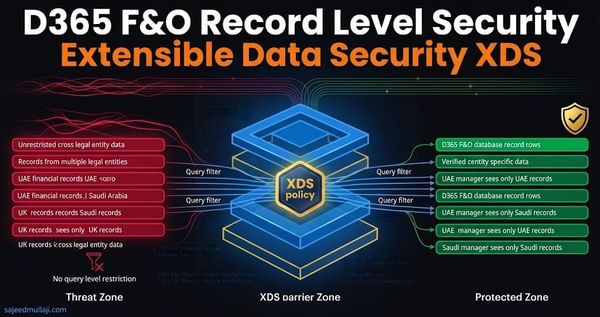
Cross Question 4: A CFO or CIO asks, "If TPF is so secure and performant, why don't we use it for every single data restriction constraint in the enterprise?"Verified Answer: TPF is a binary gate—it grants or revokes access to the entire table. It cannot filter rows based on business units or legal entities. For row-level isolation (e.g., restricting a user to view only UAE subsidiaries while blocking UK data), TPF must be paired with XDS.
TPF vs. XDS Decision Framework
Senior architects are frequently evaluated on their ability to choose the correct governance tool for the problem. Use this exact decision matrix to determine which framework applies to your governance requirement:
| Governance Dimension | Table Permissions Framework (TPF) | Extensible Data Security (XDS) |
| Target Boundary | Entire table structure and column operations | Specific rows and records within a table |
| Execution Engine | AOS Kernel Metadata Layer (AOSAuthorization) | Database Query Generation Layer (Dynamic SQL WHERE clause) |
| Performance Impact | Negligible (In-memory bit-mask check) | Moderate to high (Can disrupt AOS table caching and add query latency) |
| Primary Use Case | Stopping unauthorized API/OData extraction of master financial tables (e.g., Bank Accounts, Payroll) | Enforcing multi-company or regional data segregation (e.g., UK users blocked from viewing Indian ledger data) |
| Developer Artifact | Table Properties & Security Privilege Metadata (AxTablePermission) | XDS Policy Objects, Query Objects, and Context Context Classes |
Cross Question 5: A hiring manager asks, "How do you handle pushback from development teams who claim setting AOSAuthorization to Full slows down their rapid prototyping or DevOps delivery?"Verified Answer: I explain that security debt is far more expensive than development discipline. Retrofitting kernel security after a security breach or a failed audit costs exponentially more time and budget than configuring it correctly during initial development. Governance is built into the architecture from day one.
Interview-Ready Section: Five Questions That Get Candidates Hired
When interviewing for Senior D365 Security Architect roles, mastery of TPF separates senior practitioners from general functional consultants.
Q1: Explain what happens inside the AOS kernel when a user attempts to read a table where AOSAuthorization is set to Full, but their role lacks the table permission.
- Winning Answer: "The AOS kernel intercepts the data request before query generation. It evaluates the user's effective security token against the table's permission map in memory. Finding no matching
AxTablePermissionnode linked to their active privileges, the kernel throws a security access denied exception, aborting the transaction before any SQL statement ever reaches the Azure SQL database."
Q2: How do you troubleshoot a custom integration failing with an obscure permission error when hitting a custom Data Entity, even though the service account has System Administrator privileges?
- Winning Answer: "Service accounts and integration endpoints are subject to strict privilege context evaluation. If the custom data entity maps to a custom table whose
AOSAuthorizationwas left at default or misconfigured, or if the security privilege underlying the service role lacks explicit table metadata grants, the kernel blocks the service call. I inspect the session call stack, verify the privilege mapping for the security role assigned to the batch/service user, and ensure table permissions match the entity data source."
Q3: Why is TPF considered more secure against API scraping than form-level security?
- Winning Answer: "Form-level security only governs UI components—menus, buttons, and form controls. An attacker using Postman, OData feeds, or Excel add-ins can completely bypass the UI presentation tier and query tables directly via the AOS endpoints. TPF enforces security at the data kernel level, meaning if you don't have the table permission, no API interface can extract that data."
Q4: How does TPF impact database caching on the AOS?
- Winning Answer: "Unlike XDS, which alters runtime SQL query text and can severely disrupt AOS table caching and cause cache flushes, TPF uses static security metadata evaluation. It does not modify the underlying SQL
WHEREclause structure dynamically based on row values, preserving optimal AOS table caching performance."
Q5: What is your methodology for auditing an existing D365 implementation for TPF compliance?
- Winning Answer: "I run an automated metadata audit script via Visual Studio or X++ that inventories all custom tables and table extensions. I filter for tables holding financial, PII, or master data where
AOSAuthorizationis set toNone. I then cross-reference those tables against custom privilege assignments in the AOT to ensure zero un-governed data exposures exist prior to UAT sign-off."
Frequently Asked Questions
Q1: What is the Table Permissions Framework in D365 F&O?
The Table Permissions Framework (TPF) is a core security architecture feature in Microsoft Dynamics 365 Finance & Operations that enforces table-level Create, Read, Update, and Delete (CRUD) permissions at the AOS kernel layer. It ensures that no user or integration can access table data without explicit security metadata authorization, regardless of whether they use the UI or backend APIs.
Q2: How does AOSAuthorization property work in Dynamics 365?
The AOSAuthorization property determines how strictly the AOS kernel validates user permissions before executing table operations. Ranging from None to Full, it tells the compiler and runtime engine whether table-level CRUD requests require explicit security privilege mapping, protecting sensitive enterprise data from unauthorized extraction.
Q3: What is the difference between TPF and XDS in D365 F&O?
TPF governs table-level and structural access (whether a user can touch a table at all), operating as an AOS kernel gate. XDS (Extensible Data Security) governs row-level and company-level filtering (which specific records within a table a user is allowed to see based on business criteria). They are complementary architectural controls.
Q4: Can TPF restrict field-level security in D365?
While TPF primarily governs table and operation access, when combined with secure table design patterns and table permissions mapping, it serves as the foundational architecture for preventing unauthorized data field exposure through endpoints, preventing malicious queries from reading restricted columns.
Q5: Why do custom tables in D365 need TPF configuration?
Custom tables created during implementation default to open access states if not properly configured. Without setting appropriate AOSAuthorization levels and linking them to security privileges, custom business data remains exposed to any user with general system access, violating core enterprise ITGC compliance standards.
Closing CTA
Visit sajeedmullaji.com