Architectural Masterclass: Implementing Enterprise-Grade Data Isolation with D365 F&O Extensible Data Security (XDS)
Stop financial data leakage and ensure SOX/GDPR compliance by mastering D365 F&O Extensible Data Security (XDS). Learn how to architect complex, kernel-level record isolation policies to segregate data across global regions like GCC, UK, and India.

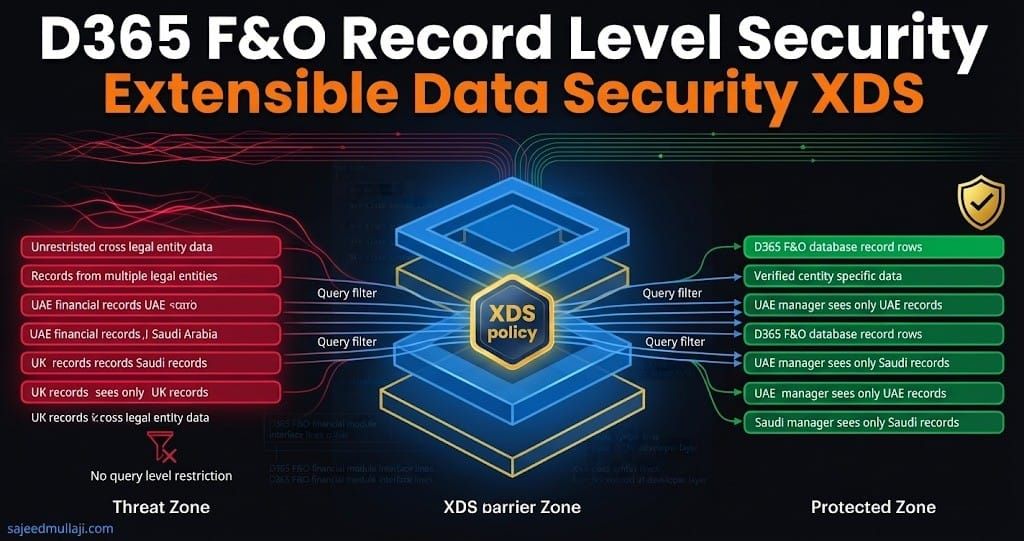
(Note: This is a written architectural blueprint only. No video demo accompanies this specific topic due to X++ development environment requirements.)
If your global Dynamics 365 Finance & Operations implementation allows a regional Finance Manager in the UK to view sensitive payroll data, or modify General Ledger entries, belonging to the India or UAE subsidiary, your organization is facing a severe regulatory compliance violation and an uncontrolled financial data risk.
Standard Role-Based Access Control (RBAC) governs what securable objects (menus, forms, entities) a user can access. It cannot govern which specific records within those objects they can see or edit.
For multinational enterprises operating across the GCC, the UK, and India, record-level data isolation is not a luxury; it is a non-negotiable requirement for SOX compliance, GDPR adherence, and internal data governance. This architectural masterclass provides the definitive guide to mastering the Extensible Data Security (XDS) framework in D365 F&O.
What is Extensible Data Security (XDS)?
Extensible Data Security (XDS) is the evolution and modernization of the old Record-Level Security (RLS) from legacy Dynamics architectures. It is a powerful, kernel-level framework that enables developers and architects to enforce complex, context-aware data security policies at the database query processor level.
Unlike UI-layer filtering, which is easily bypassed by OData calls, Excel Add-in exports, or custom data entities, XDS operates directly on the Application Object Server (AOS) kernel.
The XDS Architectural Enforcement Pipeline
When a user, service account, or integration executes a query against a table governed by an XDS policy, the following architectural sequence occurs:
- Query Interception: The AOS kernel intercepts the SQL statement destined for the Azure SQL Database.
- Policy Evaluation: The kernel evaluates active XDS policies assigned to the user's effective security context.
- WHERE Clause Injection: The kernel dynamically modifies the SQL
SELECTstatement, injecting an additionalCROSS APPLYorEXISTSpredicate based on the XDS policy's restriction criteria. - Result Set Limitation: SQL Server executes the augmented query, returning only the records the user is authorized to see.
Crucially, this process is transparent to the X++ application code. A standard select * from CustTable automatically becomes legally-entity-scoped or operating-unit-scoped without altering the underlying business logic.
Cross Question 1: An IT Audit Director asks, "How do we prove to external auditors that XDS policies cannot be tampered with by functional administrators?"
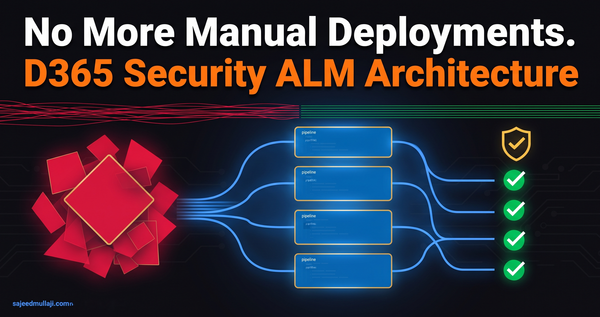
Verified Answer: XDS policies are AOT-level development artifacts deployed via model files (.axmodel) through Azure DevOps CI/CD pipelines. Functional users have zero ability to alter XDS policies in the production environment; they can only assign users to security roles that are pre-configured to utilize these policies.
XDS Architecture Components: The Security Triad & Metadata Tables
To implement XDS, you must understand both the structural AOT components and the underlying system tables that maintain runtime state.
Core Architectural Components
- The Constrained Table: The target table containing the sensitive data you wish to secure (e.g.,
LedgerJournalTable,CustTable). - The Driving / Range Table: The reference table containing the security context data (e.g., user-to-organization mapping tables).
- The Policy: The AOT object that links the Constrained Table to the Driving Table, defining the security relationship.
System Tables Governing XDS State
XDSState: A system component managed directly by the AOS kernel. It stores runtime session-based security criteria used to augment query predicates.XDSSecurityTablePermissions: Metadata tables linking security policies to specific security roles in the AOT.XDSSecurityTable: Stores the master definition of the XDS policies deployed in the application layer.
Real-World Scenario: Regional Ledger Isolation
Requirement: A global enterprise requires that Regional Finance Managers in the GCC, UK, and India can only create, view, or post General Ledger journals for the Legal Entities and Operating Units assigned to their specific region.
Why RBAC Fails: RBAC can grant a user access to the General Journal menu item. However, it cannot prevent them from changing the Company context in the UI and posting entries across cross-border subsidiaries.
The XDS Solution: We enforce a query-level constraint on LedgerJournalTable based on the user's active security context.
Complete X++ Code Walkthrough & Implementation
The following verified code snippets illustrate how XDS logic, context handling, and performance parameters are structured.
1. XDS Security Policy Context Handling
Note: The following X++ implementation requires a D365 F&O Tier 1 Developer Environment with Visual Studio and D365 Finance and Operations developer tools installed.
Code snippet
class SajeedXDSContextHandler
{
    [SysXDSPreHandlerAttribute(tableStr(LedgerJournalTable))]
    public static void setXDSContext(XDSBuildPolicyContext _context)
    {
        // Dynamically append ranges or security contexts to kernel evaluation
        _context.addRange(tableStr(LedgerJournalTable), fieldStr(LedgerJournalTable, DataAreaId), curExt());
    }
}
2. Constrained Table and Security Policy Metadata Definition
Note: The following X++ implementation requires a D365 F&O Tier 1 Developer Environment with Visual Studio and D365 Finance and Operations developer tools installed.
XML
<?xml version="1.0" encoding="utf-8"?>
<AxSecurityPolicy xmlns:i="http://www.w3.org/2001/XMLSchema-instance" xmlns="">
  <Name>LedgerJournalIsolationPolicy</Name>
  <PrimaryTable>sajeedSecurityMappingTable</PrimaryTable>
  <ConstrainedTables>
    <AxSecurityPolicyConstrainedTable>
      <Table>LedgerJournalTable</Table>
      <Cardinality>ZeroOrMore</Cardinality>
      <Mandatory>Yes</Mandatory>
    </AxSecurityPolicyConstrainedTable>
  </ConstrainedTables>
  <ContextType>RoleProperty</ContextType>
  <ContextString>RegionalFinanceContext</ContextString>
  <QueryReference>SajeedGLJournalPolicyQuery</QueryReference>
  <Enabled>Yes</Enabled>
</AxSecurityPolicy>
3. CacheLookup Property Considerations
Note: The following X++ implementation requires a D365 F&O Tier 1 Developer Environment with Visual Studio and D365 Finance and Operations developer tools installed.
Code snippet
// Architectural Principle:
// When an XDS policy is active on a table, setting CacheLookup to 'EntireTable'
// is invalidated because the kernel cannot serve static global memory.
// Tables requiring high-performance caching should avoid restrictive XDS scoping,
// or leverage 'NotInTTS' / 'Found' properties appropriately to maintain query execution plans.
4. XDSState Inspection and Diagnostic Handling
Note: The following X++ implementation requires a D365 F&O Tier 1 Developer Environment with Visual Studio and D365 Finance and Operations developer tools installed.
Code snippet
class XDSStateDiagnostic
{
    public static void inspectRuntimeSessionContext()
    {
        // XDSState is handled by the AOS kernel memory management.
        // To inspect active runtime security SQL injection for debugging:
        ModelSecPolRuntimeEx secRuntime;

        while select secRuntime
            where secRuntime.UserId == curUserId()
        {
            info(strFmt('Active XDS Policy Query: %1', secRuntime.ModeledQueryDebugInfo));
        }
    }
}
5. Mitigating Common Performance Mistakes
Note: The following X++ implementation requires a D365 F&O Tier 1 Developer Environment with Visual Studio and D365 Finance and Operations developer tools installed.
Code snippet
// ANTI-PATTERN (Performance Killer):
// Joining large unindexed staging tables or executing multi-level nested loops
// inside an XDS query range method causes CPU spikes and database deadlocks.

// CORRECT APPROACH:
// 1. Ensure the driving/range table has a clustered index on (UserId, DataAreaId).
// 2. Keep the XDS query structure flat with direct inner joins.
// 3. Utilize set-based filtering rather than record-by-record iteration.
Cross Question 2: A Lead Developer asks, "Why are we using event-driven policy contexts instead of legacy table override methods?"
Verified Answer: Modern D365 architecture relies on extensible event handlers and attribute-based pre-handlers (SysXDSPreHandlerAttribute) rather than legacy framework overrides, ensuring maintainability across cumulative platform updates.
Performance Optimization: The CacheLookup Dilemma
The number one reason D365 F&O instances suffer enterprise-wide performance degradation post-go-live is misconfigured XDS policies.
When XDS injects a WHERE clause or CROSS APPLY predicate, it adds a complex join to every single database read operation on the constrained table.
The Root Cause: Table Caching Disruption
D365 F&O relies heavily on AOS-level caching for frequently read tables (CustTable, VendTable). If a constrained table is configured with CacheLookup set to EntireTable, applying an XDS policy on that table invalidates the entire AOS cache for that table. The AOS kernel can no longer serve data from memory and must force every read operation down to the Azure SQL Database to apply the dynamic XDS filter.
Cross Question 3: A CFO asks, "We are willing to invest in extra Azure SQL capacity to handle the XDS security joins. Is that a valid fix for the performance hit?"
Verified Answer: No. The performance bottleneck is not the Azure SQL processing time for the WHERE clause; it is the invalidation of the AOS Kernel Cache. Pouring more money into SQL capacity does not fix an architectural bottleneck at the AOS layer.
XDS Extension to Power Platform Virtual Entities
With the integration of Dynamics 365 data into Microsoft Power Platform (Power Apps, Power BI) via Virtual Entities, ensuring data security isolation across the hybrid boundary is critical.
When a Power App performs a List operation on a D365 F&O Virtual Entity, the OData call translates into a native D365 F&O query executed by the OData data provider. The D365 F&O security kernel respects the logged-in user's security context during this translation. Therefore, any XDS policy applied to the underlying F&O table automatically applies to the Power Platform Virtual Entity, guaranteeing uniform data isolation across the hybrid boundary.
XDS vs. TPF: The Definitive Governance Decision Framework
Senior architects are evaluated on choosing the correct governance tool for the requirement. Using the wrong tool creates either security vulnerabilities or severe performance overhead.
| Governance Requirement | Use TPF (Table Permissions Framework) | Use XDS (Extensible Data Security) |
| Primary Scope | Structural Access (Can a user touch the table at all?) | Row-Level Isolation (Which specific records within the table can they see?) |
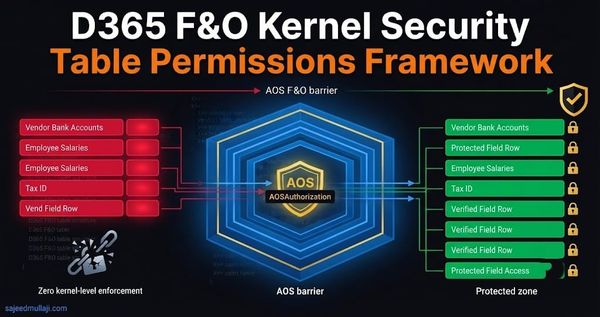
| Execution Layer | AOS Kernel metadata gate (AOSAuthorization) | Database Query Processor (Dynamic WHERE clause injection) |
| Performance Impact | Negligible (In-memory bit-mask check) | Moderate to high (Interrupts AOS caching, adds join complexity) |
| Primary Use Case | Stopping API/OData scraping of master tables (e.g., Bank Accounts, Payroll) | Enforcing multi-company ledger isolation, regional data scoping, operating unit segregation |
| Granularity | Table-level and field-level structural access | Record-level (row-level) filtering |
| Synergy | Use TPF to secure table structure (Full authorization) and XDS to filter rows within that table. | Use XDS to isolate data; TPF provides the underlying structural gatekeeping. |
Cross Question 4: An interviewer asks, "Can I bypass an XDS policy by accessing data through a Custom Data Entity?"
Verified Answer: No. Properly constructed XDS policies apply universally to table access, regardless of whether the entry point is a Form, an OData Service, or a custom Data Entity built on top of the constrained table.
Interview-Ready Section: Five Questions That Get Candidates Hired
When interviewing for Senior D365 Security Architect roles in GCC, UK, or India, mastery of XDS separates senior practitioners from functional consultants.
Q1: Explain what happens inside the D365 kernel when an XDS policy is active for a user performing a select count() operation.
- Winning Answer: "The AOS kernel intercepts the count statement before it reaches SQL Server. It analyzes the active XDS policy, retrieves the security context values from the
XDSStatetable for the user session, and dynamically injects anEXISTSorCROSS APPLYpredicate into the T-SQLWHEREclause. SQL Server then executes the modified count query against the filtered dataset."
Q2: Describe the exact technical reason why applying XDS on a table set to EntireTable cache causes severe performance degradation.
- Winning Answer: "EntireTable cache means the AOS serves read requests from memory, bypassing SQL. Activating an XDS policy invalidates the EntireTable cache for that table because the kernel can no longer serve a generic, in-memory record. It must force every subsequent read operation to go down to the Azure SQL Database to perform the dynamic WHERE clause filtering, destroying throughput."
Q3: How do you debug an XDS policy that appears to be applying the wrong security scope to a user in a multi-entity hierarchy?
- Winning Answer: "I first utilize the standard trace parser to inspect the augmented SQL query generated by the AOS kernel. Secondly, I use X++ diagnostics to inspect the contents of runtime session state tables to verify the exact organization or hierarchy context being passed to the framework."
Q4: What is the difference in implementation approach between using static role properties versus dynamic context handlers?
- Winning Answer: "Static role property scoping links policies directly to specific Security Roles in metadata. Dynamic context handlers utilize X++ event handlers (
SysXDSPreHandlerAttribute) to evaluate security context at runtime, which is necessary for complex hierarchy-based security like HCM position reporting lines."
Q5: How do you audit an existing implementation for XDS compliance to ensure no sensitive tables are left un-governed?
- Winning Answer: "I run an automated X++ diagnostic script that inventories all tables with
CacheLookupset toEntireTablethat also hold financial or PII data. I cross-reference those tables against security policy permissions metadata to ensure they are properly constrained by appropriate XDS policies."
Cross Question 5 (Woven In): A hiring manager asks, "What is your strategy for managing the XDS implementation lifecycle across a complex multi-country rollout where data isolation requirements differ by region?"
Verified Answer: I manage XDS policies as distinct AOT packages per region, deployed via Azure DevOps pipelines. We use feature toggles or environment-specific configuration tables to activate the correct regional policies based on the legal entity setup in that specific environment instance.
Frequently Asked Questions
Q1: What is Extensible Data Security (XDS) in D365 F&O?
Extensible Data Security (XDS) is the core D365 F&O architecture framework that enforces complex, context-aware, record-level security at the database query processor level. It dynamically modifies SQL queries generated by the AOS kernel to restrict which specific records a user can read or edit based on their assigned security context.
Q2: How does XDS improve ERP data security compliance?
XDS is essential for achieving compliance with regulations like SOX, GDPR, and GCC data sovereignty laws. By implementing XDS, organizations enforce strict segregation of duties at the record level, ensuring regional finance managers cannot view or post transactions belonging to unauthorized subsidiaries.
Q3: What is the performance impact of implementing XDS policies?
If implemented incorrectly on heavily cached tables, XDS can degrade system performance by invalidating the AOS EntireTable cache. However, with proper architectural analysis—choosing correct CacheLookup settings and avoiding XDS on high-volume transactional tables—performance impact is minimized.
Q4: What is the difference between TPF and XDS in D365 security?
TPF governs structural access (whether a user can interact with a table at all), operating as an AOS kernel gate. XDS governs row-level isolation (which specific records within that table the user is permitted to access). They are complementary frameworks used together for defense-in-depth.
Q5: How does XDS handle data isolation for Power Platform Virtual Entities?
Because D365 F&O Virtual Entities are OData projections of native F&O tables, the security kernel automatically applies active XDS policies to underlying data when a Power Platform user performs a query, ensuring consistent data isolation across the hybrid boundary.
Closing CTA
Visit sajeedmullaji.com