D365 Dataverse Business Unit Security: Enforcing Legal Entity Data Isolation

If you connect Dynamics 365 Finance and Operations to the Power Platform without translating your Legal Entities, you are architecting a data breach.
Inside F&O, your UAE financial data and your Saudi Arabian financial data are perfectly isolated. But the moment you expose that data to a Power App using Dual-Write or Virtual Entities, those boundaries disappear by default. If your architecture is flawed, a clerk in Dubai opens their app and suddenly has full visibility into Riyadh's pricing, vendors, and purchasing data.
For enterprises operating in the GCC, UK, and India, a cross-company data leak is not just an IT error — it is an immediate ITGC audit failure and a critical breach of data sovereignty. Here is exactly how to map F&O legal entity restrictions into Dataverse Business Unit structures to make cross-company data leakage mathematically impossible.
The Architecture: Mirroring the Enterprise
If you are delivering a multi-national rollout, you cannot rely on default settings to protect your data. You must physically build the organizational structure in the cloud to house your users.
In the Power Platform Admin Center, we establish the foundation by creating a strict Business Unit hierarchy that mirrors the F&O setup. Using our root organization as the parent, we deploy UAE Operations and Saudi Arabia Operations sitting as child nodes.
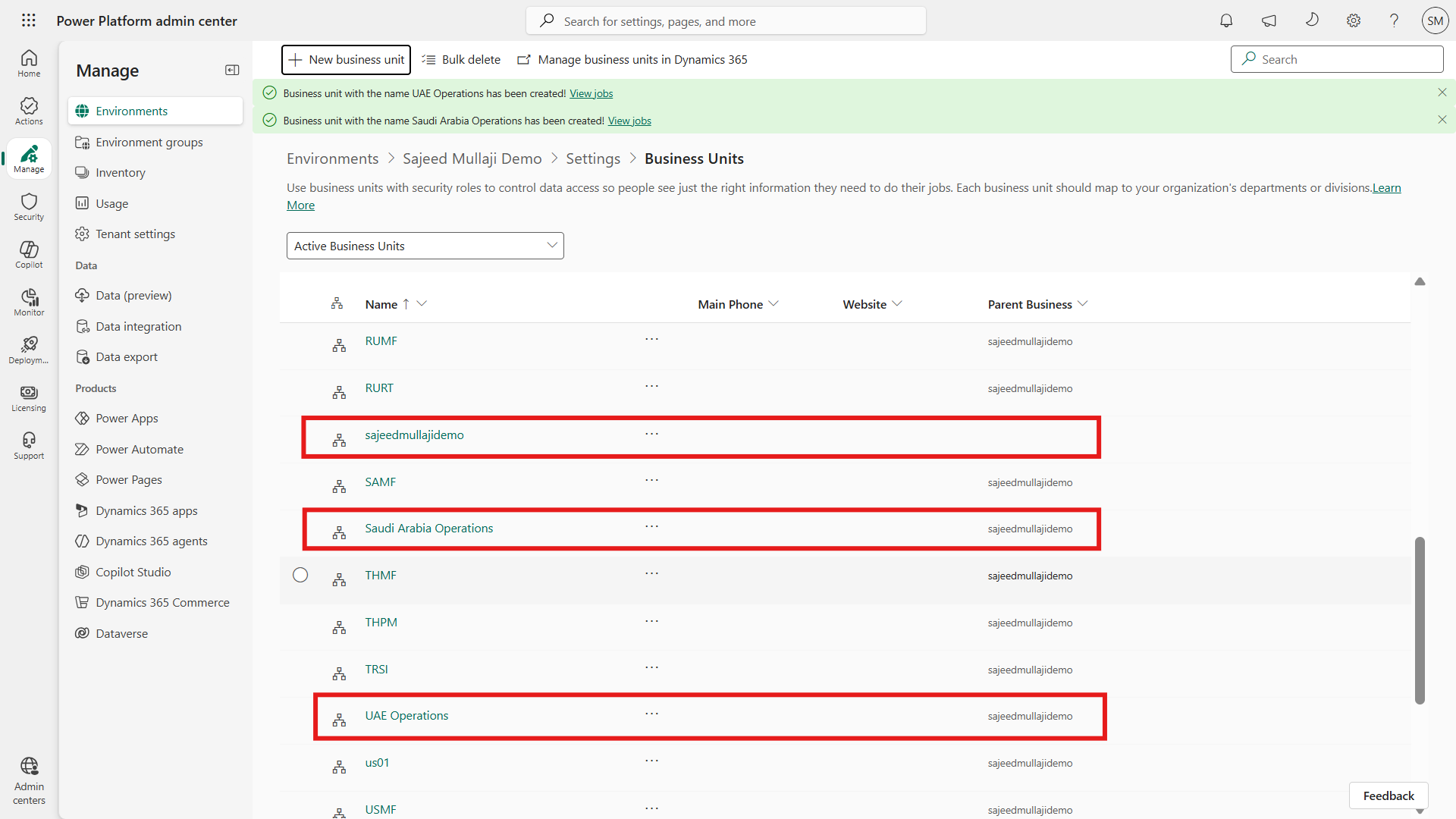
At this stage, many Solution Architects make a fatal assumption: Does Dual-Write automatically create these Business Units when I sync F&O companies? No, it does not. Dual-Write maps the F&O company code to a field in Dataverse, but it will not automatically build your Business Unit security hierarchy. If you want data sovereignty, you have to architect this physical structure yourself.
The System Warning: A Feature, Not a Bug
Once the structure is built, we place the users in their physical silos. We assign the UAE Sales Manager to the UAE Operations Business Unit, and the KSA Sales Manager to the Saudi Arabia Operations Business Unit.
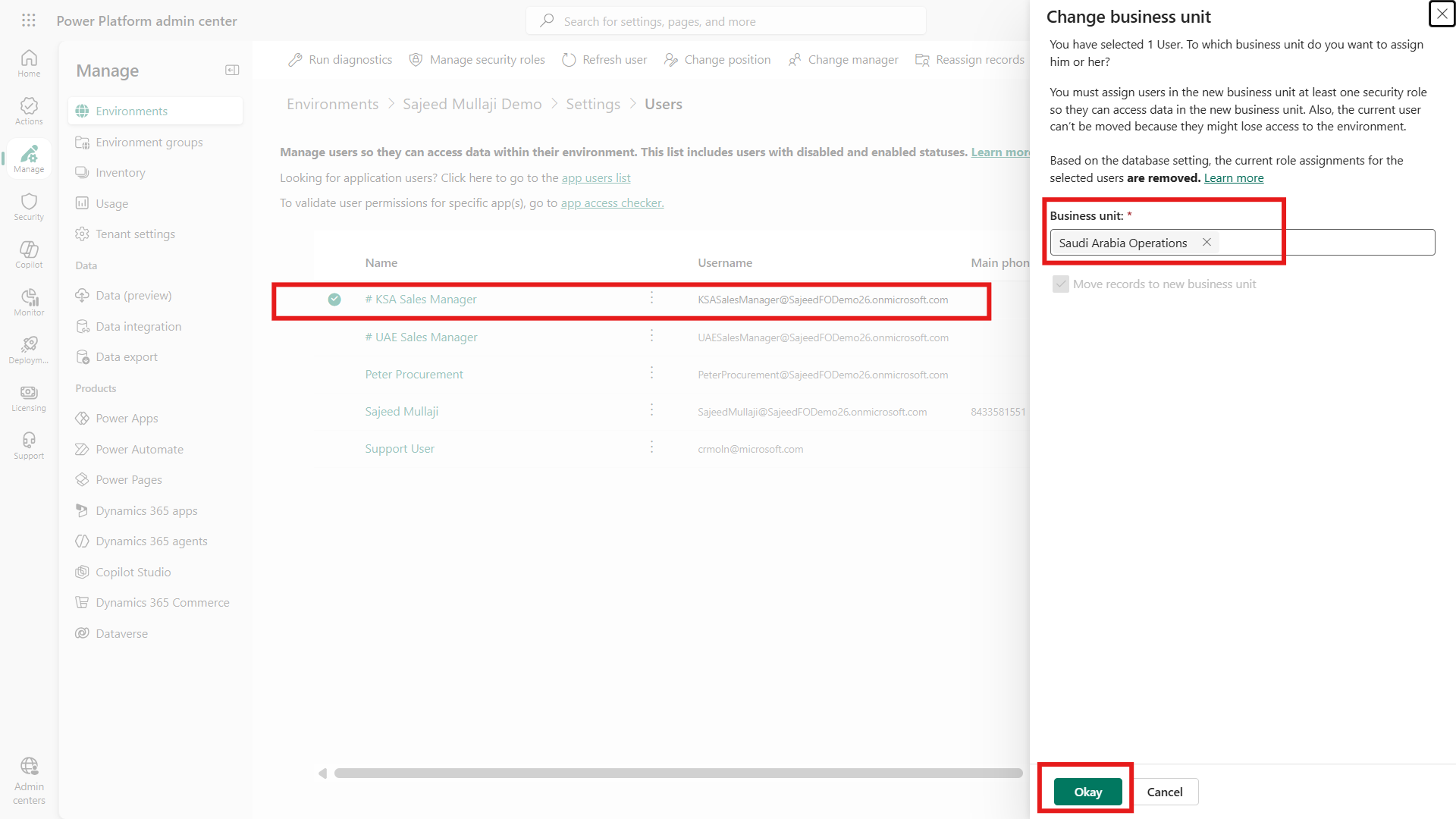
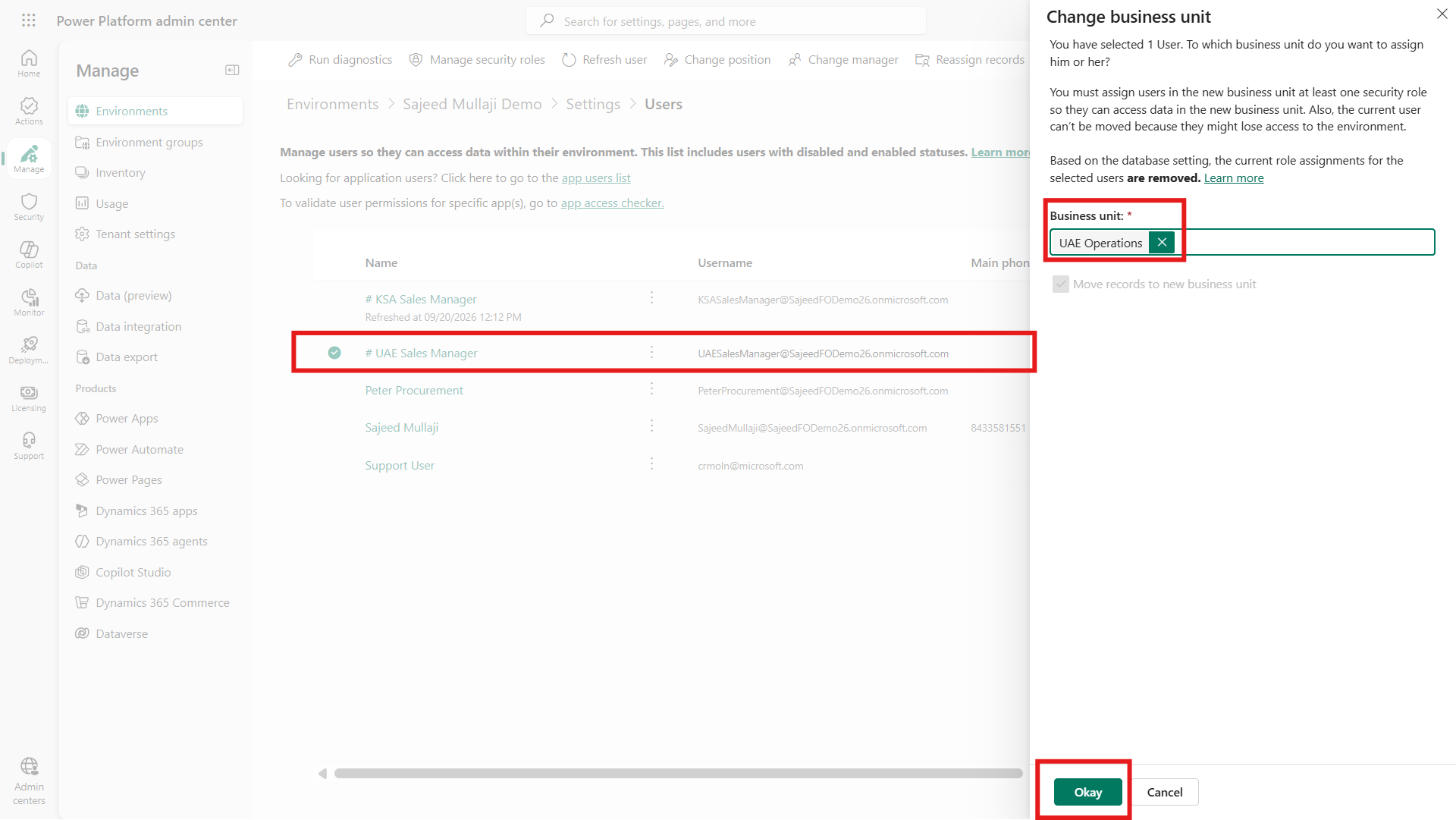
When you move a user between Business Units, a system warning appears stating that all role assignments have been removed. When IT Operations teams see this in production, they usually panic. Do not panic. This is a critical platform security mechanism.
IT Audit Directors frequently ask: If an employee transfers from UAE to Saudi mid-month, do they accidentally take their UAE data access with them? This system warning is your guarantee. The millisecond HR updates their department and they are moved into the new Business Unit, Dataverse intentionally strips all their old security roles. They physically cannot take their previous visibility with them. It stops cross-border data leakage dead in its tracks.
The Security Role Engine
The engine that drives this isolation is the security role configuration. We do not use the out-of-the-box system roles. We deploy a custom role — the F&O Isolated Sales Role.
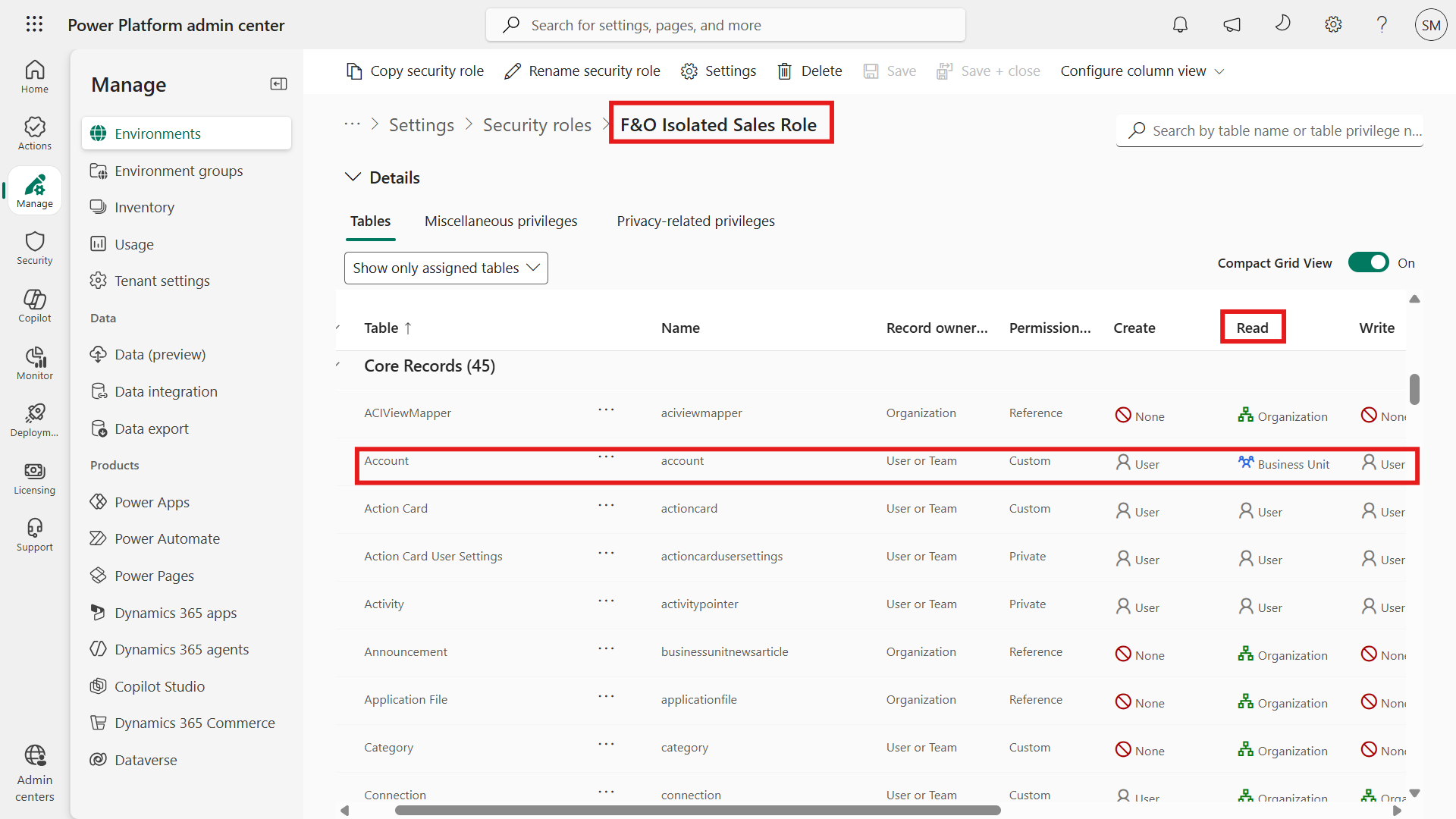
Inside this role, the Read privilege for the Account table is set precisely to Business Unit level — shown in blue in the modern PPAC interface. If you leave this set to Organisation level, you grant Organisation-level access, meaning the user sees across every single Legal Entity globally.
When you explain this strict siloing, the immediate operational question is always: How does the Global CFO see consolidated data across both regions without breaking the hierarchy? The answer is simple. We do not break the hierarchy, and we do not move the CFO to the root Business Unit. We keep the CFO in their home Business Unit, but we assign them a different security role where that Read privilege is explicitly set to Organisation level. The architectural boundaries remain intact, but their specific role pierces them legally and securely.
The Proof: Mathematical Data Isolation
To prove this architecture to a CFO or auditor, you must demonstrate the front-end reality.
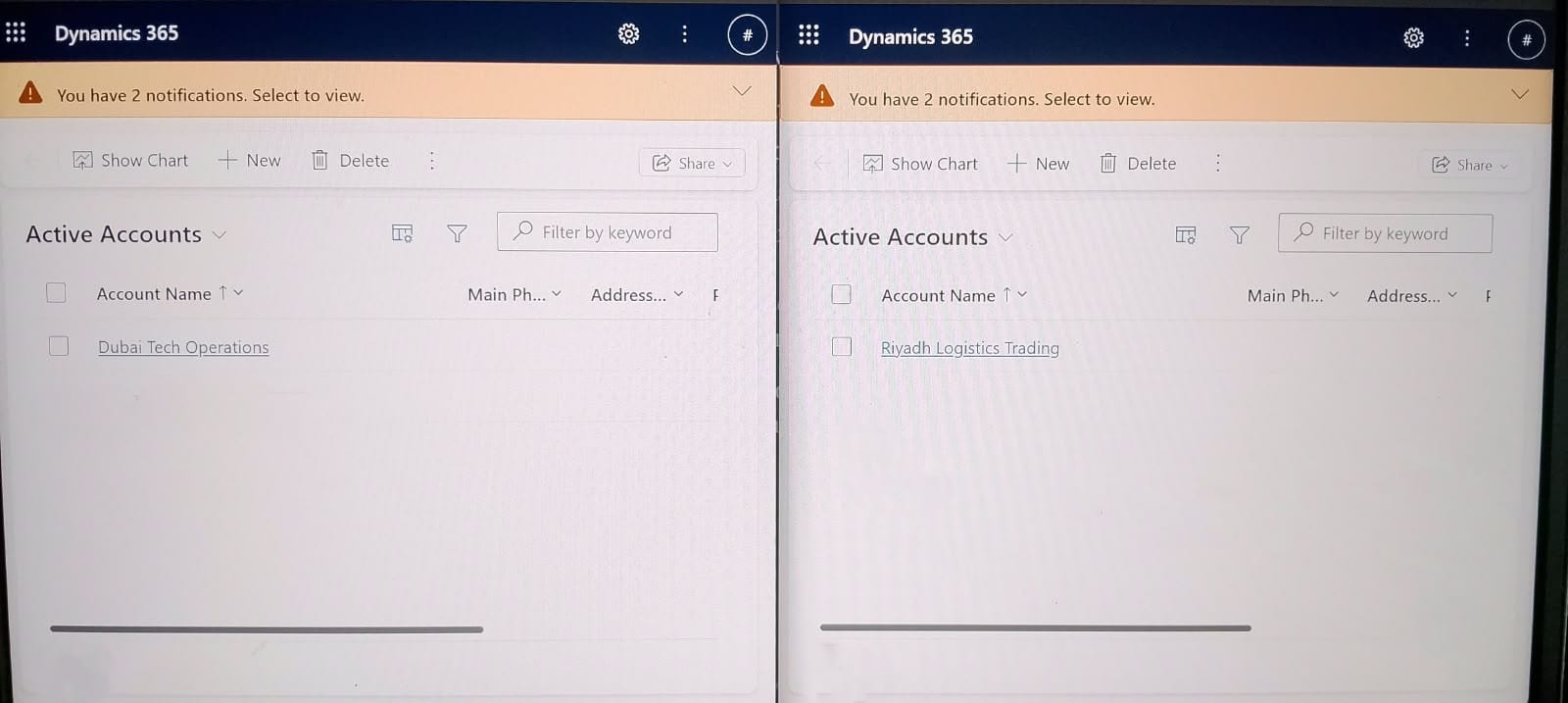
In a live split-screen test using the exact same application and querying the exact same database:
- The UAE Sales Manager logs in and sees exactly one record: Dubai Tech Operations.
- The KSA Sales Manager logs in and sees exactly one record: Riyadh Logistics Trading.
A clever Security Lead might ask: Can a technical user hit the Dataverse API directly to bypass this UI restriction and pull the other region's data? No, they cannot. Because we set the Read privilege to Business Unit level, this restriction is mathematically enforced at the database level by the Dataverse platform itself. Even if they execute a direct API query, the system will return a blank payload for any records residing outside their assigned Business Unit.
The isolation is absolute. Your data sovereignty is perfectly maintained in the cloud.
FAQ: D365 Dataverse Security and Compliance
What is Dataverse Business Unit security in D365 F&O? Dataverse Business Unit security is the architectural mechanism used to replicate D365 F&O Legal Entity boundaries in the Power Platform. It organizes users and data into isolated physical silos, ensuring employees can only access records belonging to their specific regional or departmental unit.
How do I prevent cross-company data leaks in Power Platform? To prevent cross-company data leaks, you must map your F&O Legal Entities to Dataverse Business Units and assign users strictly to their respective nodes. Furthermore, you must configure custom security roles where the Read privileges for sensitive tables are restricted to Business Unit level.
Does Dual-Write automatically enforce legal entity security in Dataverse? No, Dual-Write only maps the F&O company code string to a corresponding field on a Dataverse table — it does not configure security. You must manually architect the Business Unit hierarchy and assign the correct privilege levels to mathematically enforce data isolation.
What is the difference between Business Unit and Organisation level access in Dataverse? Business Unit level access restricts a user's visibility strictly to data owned by users within their specific Business Unit node. Organisation level access completely bypasses these silos, granting the user visibility into all records across the entire Dataverse environment, regardless of the originating Legal Entity.
How do I pass a Power Platform ITGC audit for data isolation? You pass an ITGC audit by proving that cross-company data access is restricted at the database level, not just hidden on the UI. This requires demonstrating a clear Business Unit hierarchy, role assignments stripped upon region transfer, and custom security roles explicitly denying Organisation-level read privileges.
Visit sajeedmullaji.com