D365 F&O Batch Job Identity — How One Resignation Letter Crashes Your Month-End Close
One resignation letter can crash your entire month-end close. Discover how batch jobs running under personal accounts create ghost transactions and ITGC audit failures — and the exact fix using a dedicated service account.

D365 F&O Batch Job Identity — How One Resignation Letter Crashes Your Month-End Close
Your month-end close is running on a hidden countdown timer. The moment your lead IT administrator hands in their resignation letter, your automated financial processes are set to crash.
When internal teams or implementation partners configure critical workflows, they frequently take the path of least resistance. They schedule the automated batch jobs under their own personal user accounts.
This happens constantly during the chaos of User Acceptance Testing or post-go-live hypercare. The consultant fixes a workflow, saves it under their own name, and moves on to the next fire.
The executive team remains completely unaware of this structural flaw. The system appears stable, invoices are routing for approval, and ledger consolidations are processing exactly on schedule.
But this stability is an illusion. The entire financial automation engine is tethered to a single, fragile human identity.
The Financial Consequence of Operational Collapse
When that specific employee resigns, human resources triggers the standard offboarding protocol. Their Microsoft Entra ID account is disabled to protect the corporate network.
The second that token dies, your ERP environment fractures. Every single critical automated process tied to that user’s D365 F&O batch job identity fails instantly.
Purchase order approvals stop routing. Month-end data exports freeze. Automated vendor payment sweeps do not execute. The CFO is left looking at a paralyzed system on day one of the financial close.
Recovering from this collapse is never cheap. The business faces immediate month-end close failure, which easily costs $50,000 to $200,000 in emergency remediation.
This figure includes emergency consulting rates, halted supply chains, missed vendor payment discounts, and the internal labor required to manually force transactions through the system.
The Audit Nightmare of Ghost Transactions
To prevent this operational collapse, some IT departments make a dangerous compromise. They choose to leave the terminated employee’s account active simply to keep the batch jobs running.
This decision creates ghost transactions. You now have the credentials of a terminated employee actively stamping live financial postings across your production ledger.
When an external auditor pulls the transaction logs for an ISAE 3402 or SOX review, the evidence is damning. They see a user who left the company six months ago actively mutating financial records.
You cannot definitively prove whether the system generated the transaction or if a malicious actor hijacked the dormant account. This total lack of non-repudiation is catastrophic.
You will instantly fail your D365 ITGC batch job audit. The external auditors will classify this as a material weakness in your logical access controls.
Today, we are locking down this vulnerability. We will find this risk, fix it on screen, and permanently decouple your financial automation from human turnover.
Step 1: Exposing the Security Gap
Navigate directly to System administration, then to Inquiries, and open the Batch jobs screen.
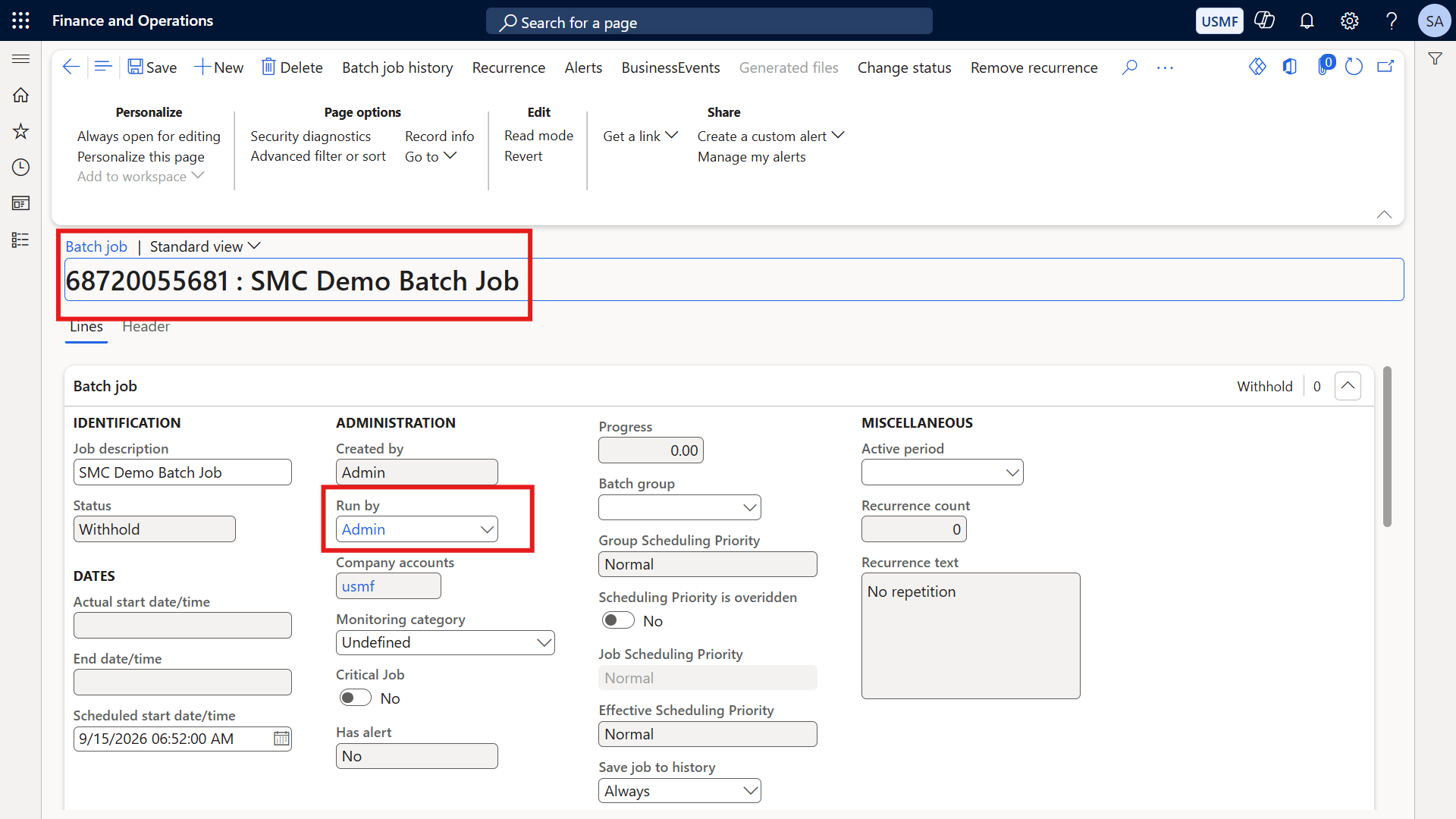
Look at the main grid and focus your attention on the D365 batch job Run by user column. It is incredibly easy to overlook this specific data point, but it holds the key to your system's stability.
(Before Screenshot: Grid showing critical batch jobs running under a personal Admin account)
If you see a personal employee name or a generic human "Admin" account in this column, your environment is at risk. You are looking at the exact source of future operational collapse and ghost transactions.
Step 2: Accessing the Batch Job Details
We need to anchor this automated process to a secure, non-interactive identity. Do not try to edit the record directly from the main grid view.
Click directly on the Job ID hyperlink. This action will open the dedicated batch job details page.
Once the details page loads, navigate to the action pane at the top of the screen and click the Edit button.
Step 3: The Modern D365 Insight
This is where many veteran ERP consultants make a fundamental mistake based on outdated system knowledge.
Historically, you were forced to change a batch job's status to "Withhold" before the system would allow you to edit the executing user. If you did not pause the job, the field remained permanently locked.
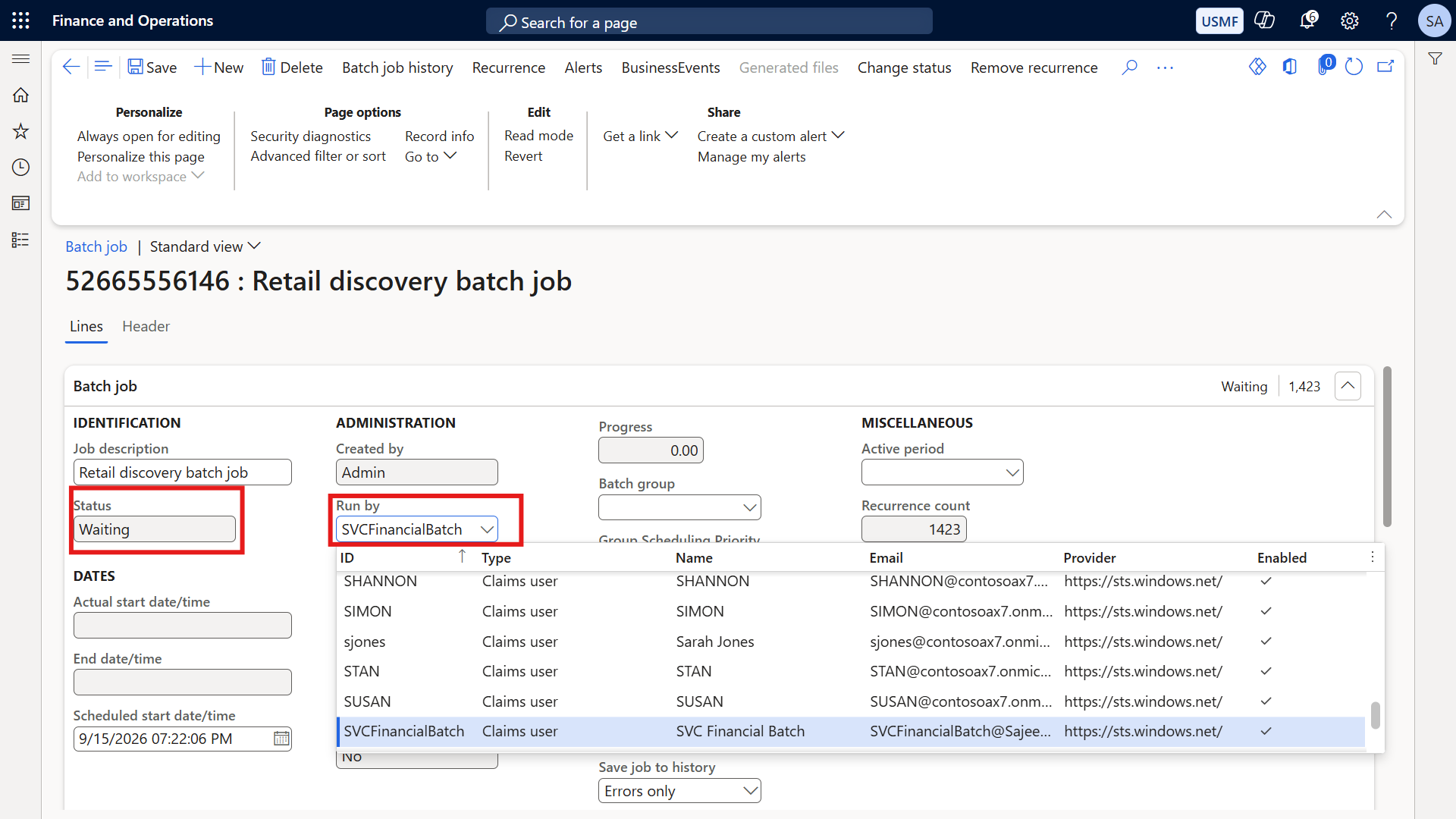
In modern D365 environments, this limitation no longer exists. The system allows you to edit the Run by field directly, right now.
You can make this critical governance change while the job is safely in a "Waiting" status. This modern capability means you can fix the security gap instantly, without ever disrupting the active batch queue.
Step 4: Implementing the Service Account
With the record in edit mode, click the dropdown menu on the Run by field.
You are going to replace the vulnerable personal account with a dedicated D365 batch job service account.
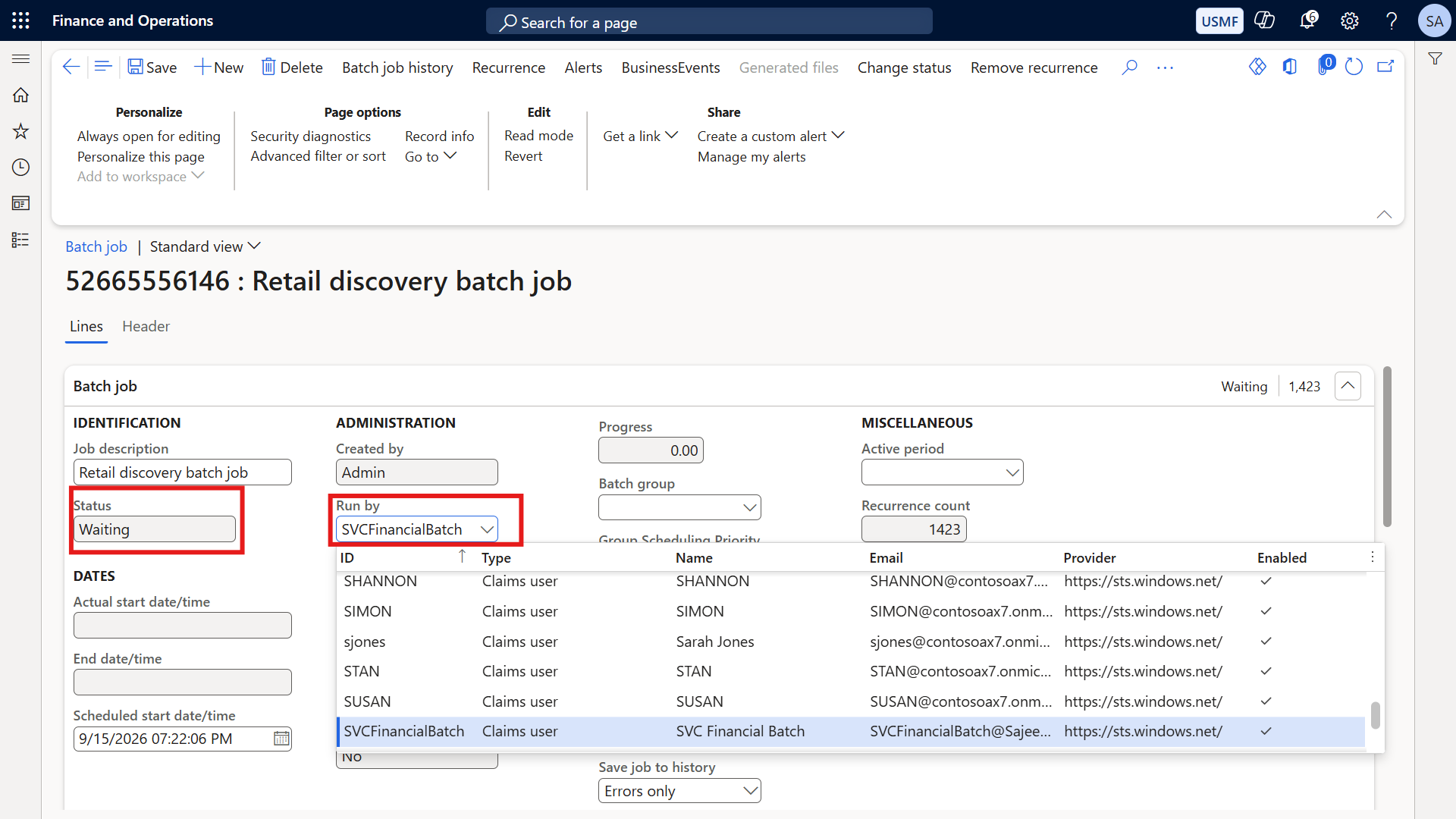
Select your pre-configured, non-interactive service account—such as "SVC Financial Batch"—from the user list. Once selected, click Save on the action pane.
Step 5: The Immutable Proof
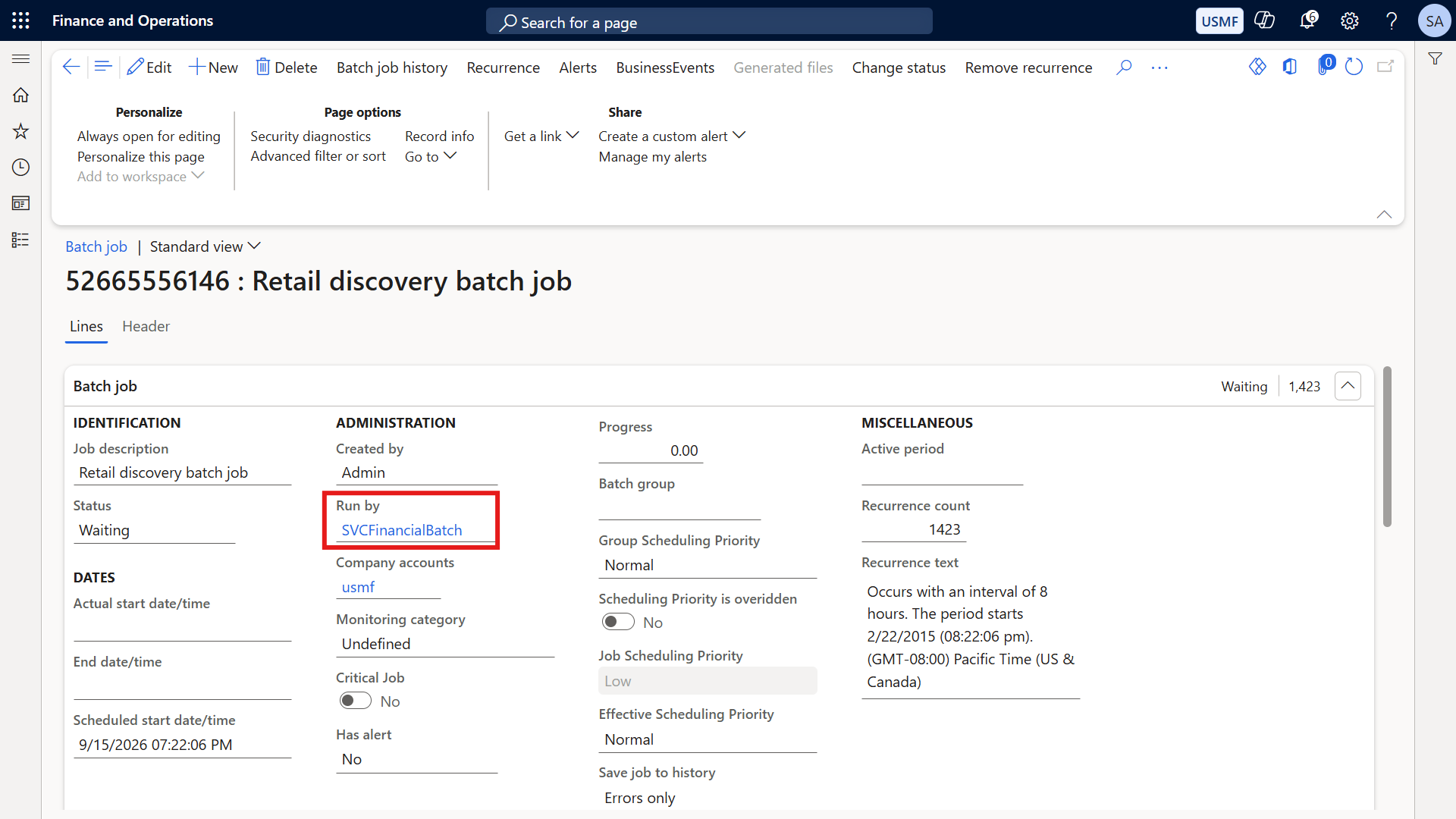
Look at the record on your screen right now. The Run by field is securely and permanently anchored to the SVC Financial Batch account.
(After Screenshot: Run by field showing the dedicated SVC Financial Batch account)
Your financial automation is now completely decoupled from human employee turnover. When your lead architect resigns tomorrow, your month-end close will not even flinch.
More importantly, you have secured clean, compliant audit evidence. When auditors review the logs, they will see a governed system account executing the automation, exactly as IT General Controls mandate.
Addressing the Executive Cross Questions
Whenever I architect this transition for enterprise clients, CFOs and IT Audit Directors ask two specific questions regarding D365 automated process governance.
Can we use a shared IT Admin account instead of a dedicated service account?
No. Using a shared interactive account is a severe governance violation. Shared accounts are still subject to human resources termination policies and unpredictable multi-factor authentication (MFA) prompts.
A true, non-interactive service account is explicitly excluded from these human lifecycle processes. It never gets blocked by MFA, and it never gets disabled by an offboarding script, ensuring zero downtime.
Does the service account need System Administrator rights to run batch jobs?
Absolutely not. Assigning the System Administrator role to a service account is an immediate ITGC audit finding and a massive security vulnerability.
To enforce strict D365 F&O batch job security, you must apply the principle of least privilege. Assign the account the standard Batch job manager role, plus only the specific operational roles needed to execute that exact workflow. Nothing more.
Securing Your Global Financial Perimeter
Do not let your enterprise architecture rely on the unpredictable lifespans of personal user accounts.
Master the governance, secure the automation, and protect your ledger from unnecessary downtime and audit failures.
For the complete blueprint on securing your ERP architecture, visit my governance series at sajeedmullaji.com/tag/d365-governance-roadmap.
If you need structured matrices to audit your current batch accounts and security roles, you can download them directly at sajeedmullaji.com/tag/templates.
Stop leaving your financial perimeters to chance. For more tested, brutal, and verified enterprise security breakdowns, visit sajeedmullaji.com.
Executive Q&A: Batch Job Governance for CFOs and Audit Directors
Q: If a batch job fails while running under a non-interactive service account, how do we notify the correct business owner without a monitored email inbox?You configure D365 batch job alerts to route error notifications to a shared distribution list, a ticketing system, or a specific Microsoft Teams channel. The service account executes the system job silently, but the operational failure alerts are directed instantly to the relevant human financial controllers for immediate triage.
Q: Does changing the "Run by" user on an existing batch job impact the historical execution logs tied to the previous employee?No. The batch job history table retains the exact execution context and user identity of all past runs. Changing the Run by user only affects future executions from the moment the updated record is saved, perfectly preserving the integrity of your historical audit trail for external reviewers.
Q: How do we prove to external auditors that nobody is secretly logging into the D365 user interface using the credentials of the batch service account?You must work directly with your infrastructure team to implement Azure Entra ID Conditional Access policies. These security policies must explicitly block interactive UI sign-ins for the service account identity. This configuration provides immutable, system-level evidence to auditors that the account is strictly limited to system-to-system processing.