How to Resolve the Classic D365 F&O P2P SoD Conflict — Vendor Creation vs Invoice Posting
One user with vendor creation and invoice posting access is an open corporate checkbook. Discover the exact steps to detect and fix this P2P SoD conflict in D365 F&O using native tools only.

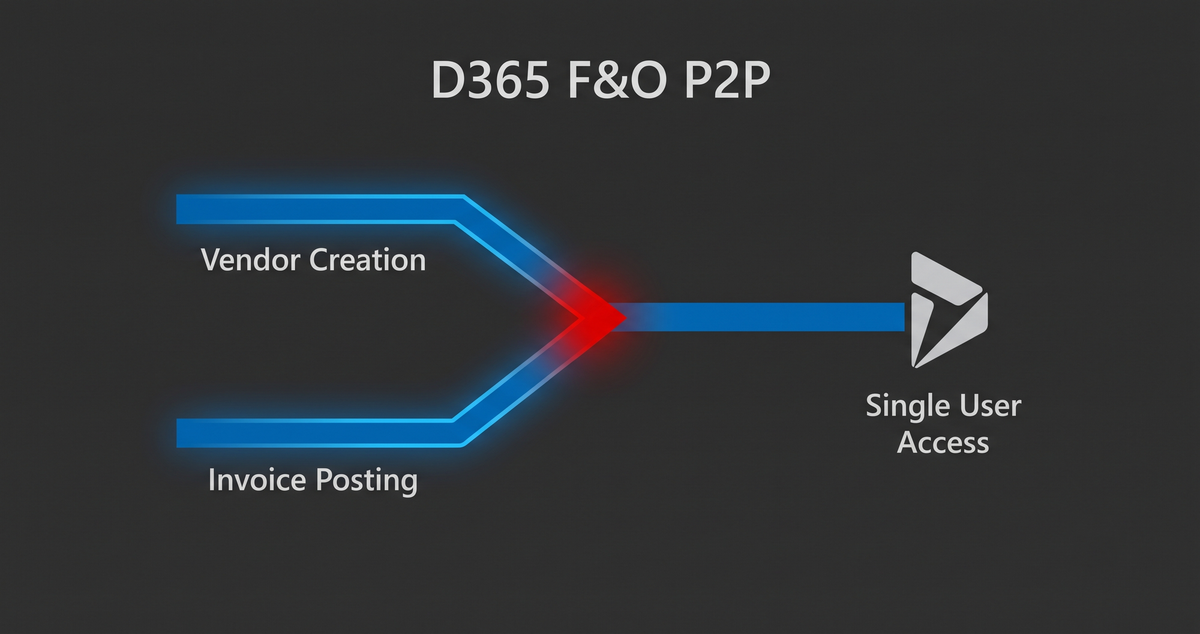
If a single user in your Microsoft Dynamics 365 Finance and Operations environment can create a vendor and post an invoice to pay them, you do not have an enterprise ERP. You have an open corporate checkbook.
In the world of corporate governance, few items trigger immediate concern from external auditors faster than a breakdown in the Procure-to-Pay (P2P) cycle. For CFOs and IT Audit Directors, this specific D365 F&O P2P SoD conflict represents a direct pathway to financial loss, failed audits, and material weaknesses.
This guide walks you through the exact mechanics of this conflict, its real-world financial consequences, and a step-by-step technical remediation guide tested directly in D365 F&O.
The Real Financial Impact: Why This Keeps CFOs Up at Night
When segregation of duties fails in the P2P cycle, the exposure is immediate and severe.
- Direct Fraud Loss: A compromised or collusive account holding both vendor creation and invoice posting access can set up a fictitious supplier and push through fraudulent payments ranging from $10,000 to over $500,000 before detection.
- Forensic Accounting Costs: Failing an IT general controls (ITGC) audit over segregation of duties forces management into expensive, manual sample re-testing of every transaction processed by dual-role users. Forensic accounting fees for remediation easily range between $50,000 and $150,000.
Out-of-the-box Microsoft security roles are built for broad functional flexibility. When assigned together without modification, standard roles naturally create dangerous intersections.
Step-by-Step Resolution Guide in D365 F&O
To resolve this issue, you must configure a native Segregation of Duties rule, run compliance verification, execute remediation, and export clean audit evidence.
Step 1: Identify the Risk Profile (The User)
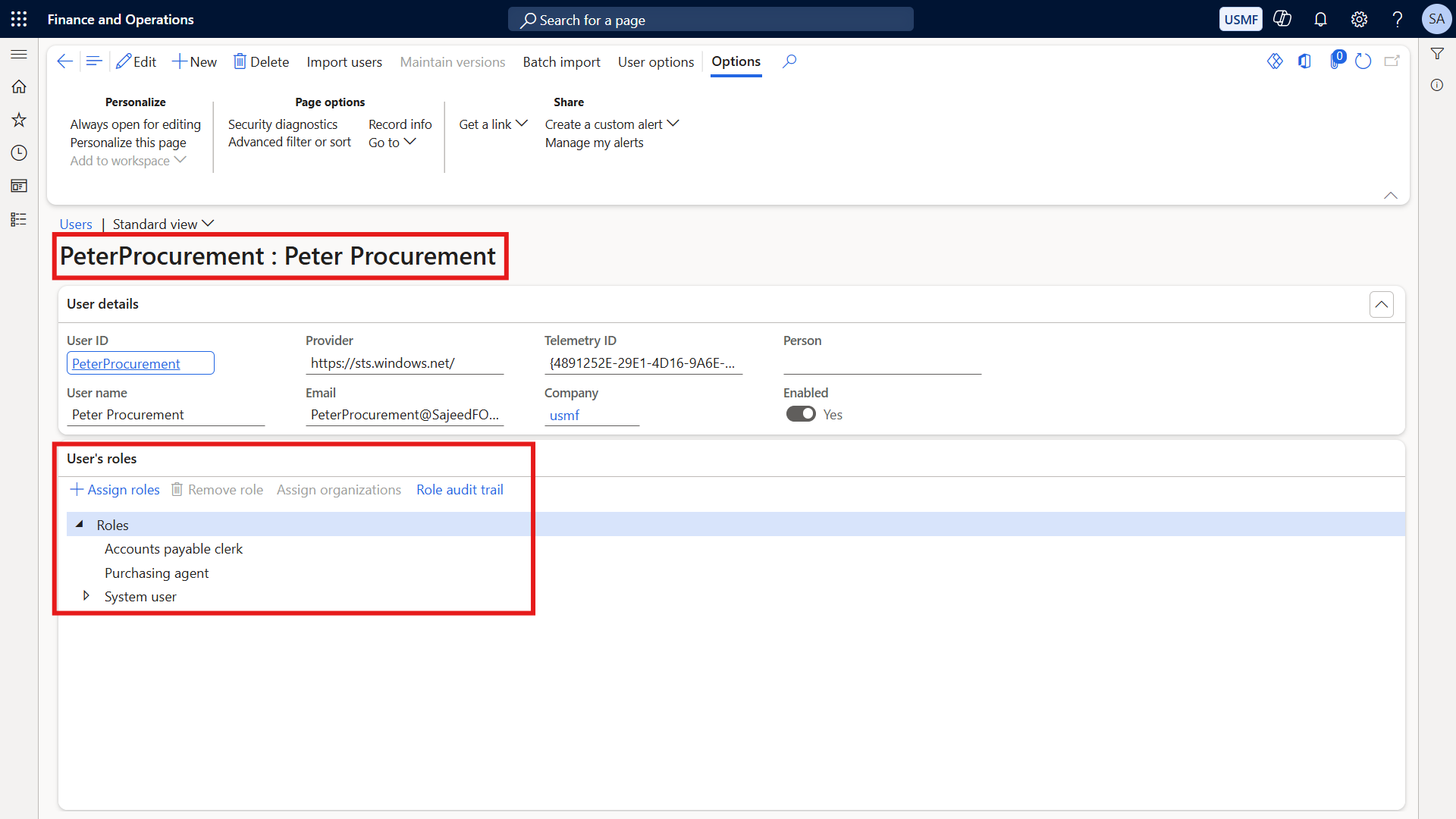
Consider our test user, Peter Procurement. During an initial system review, Peter is assigned two standard out-of-the-box roles: Accounts Payable Clerk and Purchasing Agent.
Figure 1: User security configuration showing Peter Procurement assigned both Accounts Payable Clerk and Purchasing Agent roles.
Step 2: Configure the Segregation of Duties Rule
Navigate to the native rule engine to establish your control boundary:
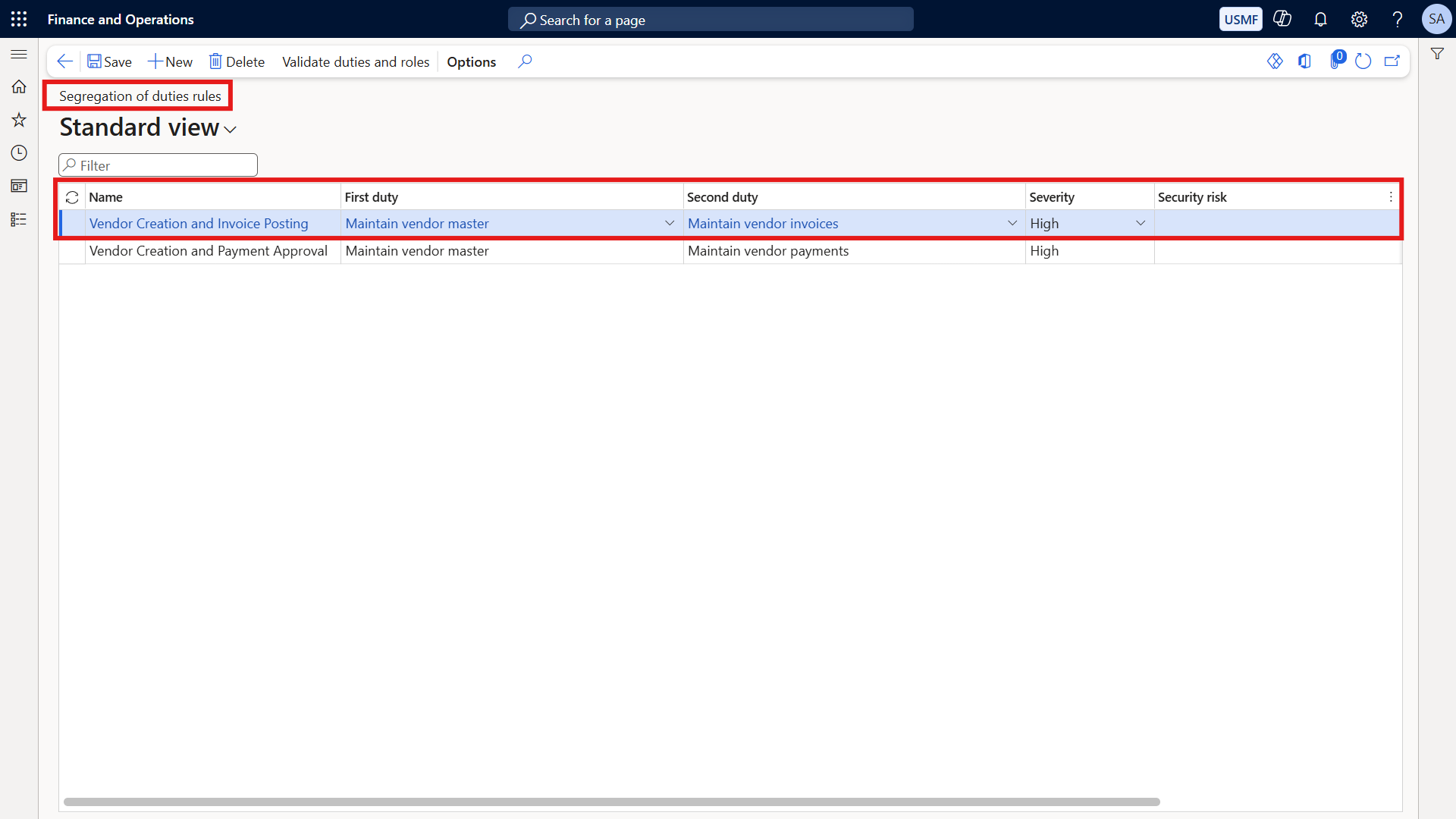
- Go to System administration → Security → Segregation of duties → Segregation of duties rules.
- Create a new rule named
Vendor Creation and Invoice Posting. - Set the First duty to
Maintain vendor master(VendVendorMasterMaintain), which governs vendor creation and bank detail modification. - Set the Second duty to
Maintain vendor invoices(VendInvoiceMaintain), which governs posting invoices against vendors. - Set the Severity to
High.
Figure 2: Segregation of duties rule definition linking VendVendorMasterMaintain and VendInvoiceMaintain with High severity.
Step 3: Run the Conflict Detection Engine
To check historical data and role drift across your organization, execute the compliance background process:
- Navigate to System administration → Security → Segregation of duties → Verify compliance of user-role assignments, and click OK.
Step 4: Review the Unresolved Conflicts Grid
Once the batch verification completes, check the results:
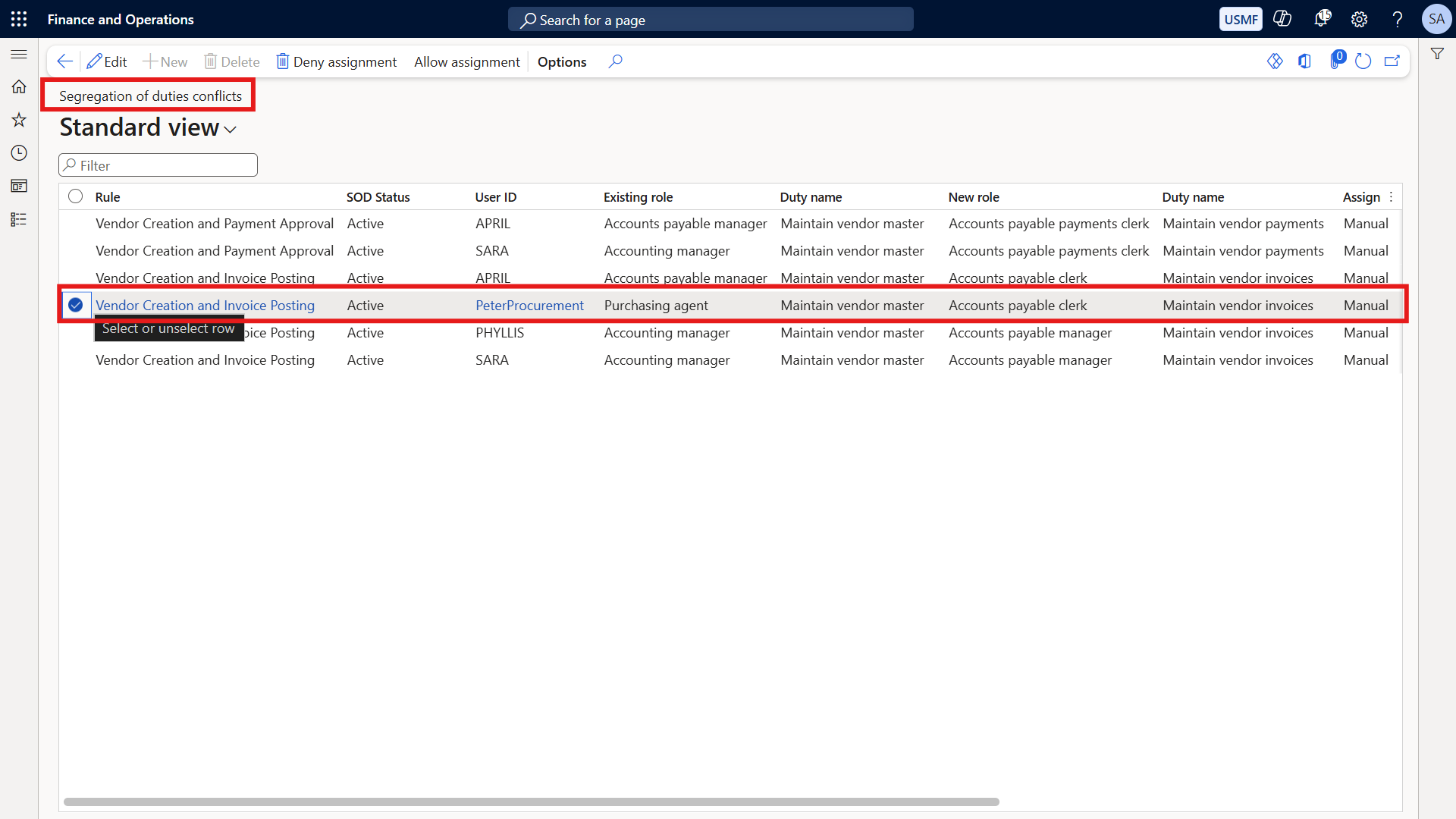
- Go to System administration → Security → Segregation of duties → Segregation of duties conflicts.
- Peter Procurement appears immediately as an unresolved conflict, cleanly mapping the overlapping duties.
Figure 3: Segregation of duties conflicts grid highlighting Peter Procurement as an unresolved violation.
Step 5: Execute Remediation
To eliminate the toxic combination:
- Go to System administration → Users → Users and select Peter Procurement.
- Open his assigned roles, select Accounts Payable Clerk, and click Remove role.
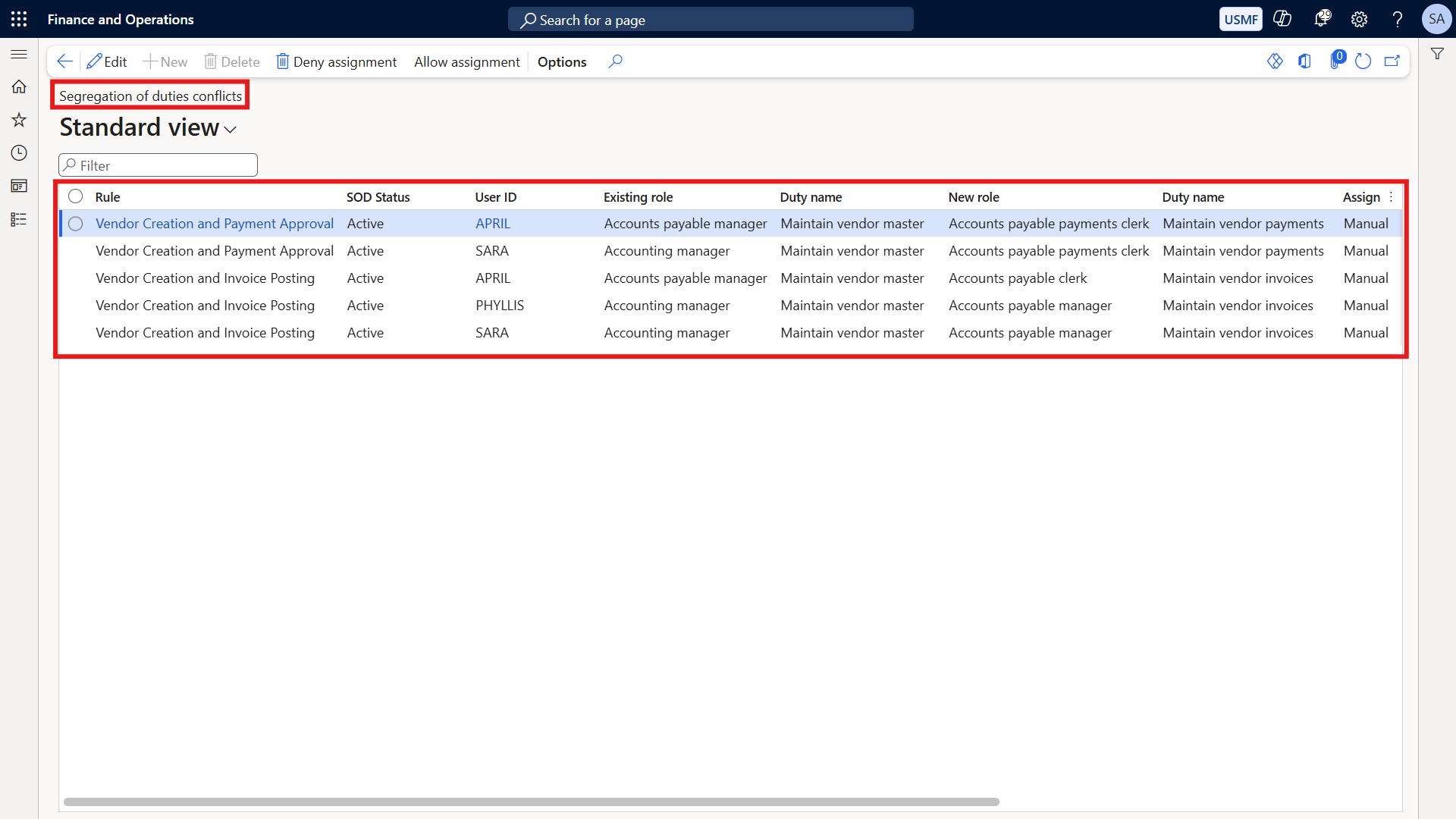
- Re-run the compliance verification process. Peter is instantly removed from the conflicts grid.
Figure 4: Clean conflicts grid showing successful remediation and absence of violations after role removal.
Step 6: Export Clean Audit Evidence
Export the conflicts grid directly to Excel to archive a clean compliance state ready for your next interim audit review. For additional templates, you can download the companion SoD Mitigation Log template available at sajeedmullaji.com.
Answering Executive Cross-Questions
During executive reviews, audit committees and technical leaders frequently challenge how these controls operate. Your architecture must address three vital questions:
Cross Question 1: Won't workflow approvals stop Peter anyway?
Answer: Workflows are a business process control operating at the user interface level. Segregation of duties is an Information Technology Application Control (ITAC). Peter can potentially bypass workflow parameters or manipulate configurations through systemic access rights. You need both controls locked down simultaneously.
Cross Question 2: What if someone genuinely needs both roles for business continuity?
Answer: D365 allows assignment overrides with documented justification. However, a Big Four auditor will demand an independent compensating control—such as a monthly management review report of all vendor master changes signed off by someone entirely outside of Accounts Payable. The justification must be specific, time-limited, and independently reviewed.
Cross Question 3: Does D365 detect this in real-time or require a batch job?
Answer: While front-end validation warnings exist during assignment, enterprise-wide historical drift requires running the batch verification engine. Never rely purely on front-end prompts when auditing a live production tenant.
Conclusion and Further Reading
Securing your financial ledger requires shifting from reactive cleanup to proactive backend architecture governance. To explore the complete framework, review our comprehensive series roadmap at sajeedmullaji.com/tag/d365-governance-roadmap.

Download the complete SoD Mitigation Log template and all professional D365 F&O security governance templates at sajeedmullaji.com/tag/templates
Executive Q&A
Q1: If an auditor finds that a user held both VendVendorMasterMaintain and VendInvoiceMaintain for three months without an active mitigating control, what level of audit finding should the CFO expect?
Answer: This will typically result in a significant deficiency or a material weakness under IT General Controls (ITGC). Because the combination allows an individual to create a vendor and disburse funds to them without independent verification, external auditors will treat the lack of compensating detective controls as a fundamental breakdown in financial reporting controls.
Q2: Does removing the Accounts Payable Clerk role solve the underlying permission creep if Peter retains custom duties containing overlapping sub-privileges?
Answer: No. Removing the standard role eliminates the direct duty-level conflict, but if Peter is assigned custom roles or duties that share underlying entry points or privileges (such as Maintain vendor bank accounts), he may still retain residual risk. A comprehensive privilege-level audit is required to ensure complete risk mitigation.
Q3: How frequently should the D365 compliance verification batch job run in a stable production environment?
Answer: In a mature organization, the verification job should run on an automated recurring nightly schedule. This ensures that any emergency role assignments granted during support windows are flagged and reviewed by security administrators within 24 hours rather than waiting for quarterly audit cycles.