D365 F&O Security: FIDO2 Step-Up Authentication and Conditional Access Contexts
Explore an enterprise-grade architecture for D365 F&O governance using Entra ID Authentication Contexts and FIDO2 passkeys. Discover how to enforce phishing-resistant biometric step-up controls for high-risk financial workflows and satisfy strict ITGC audit requirements.

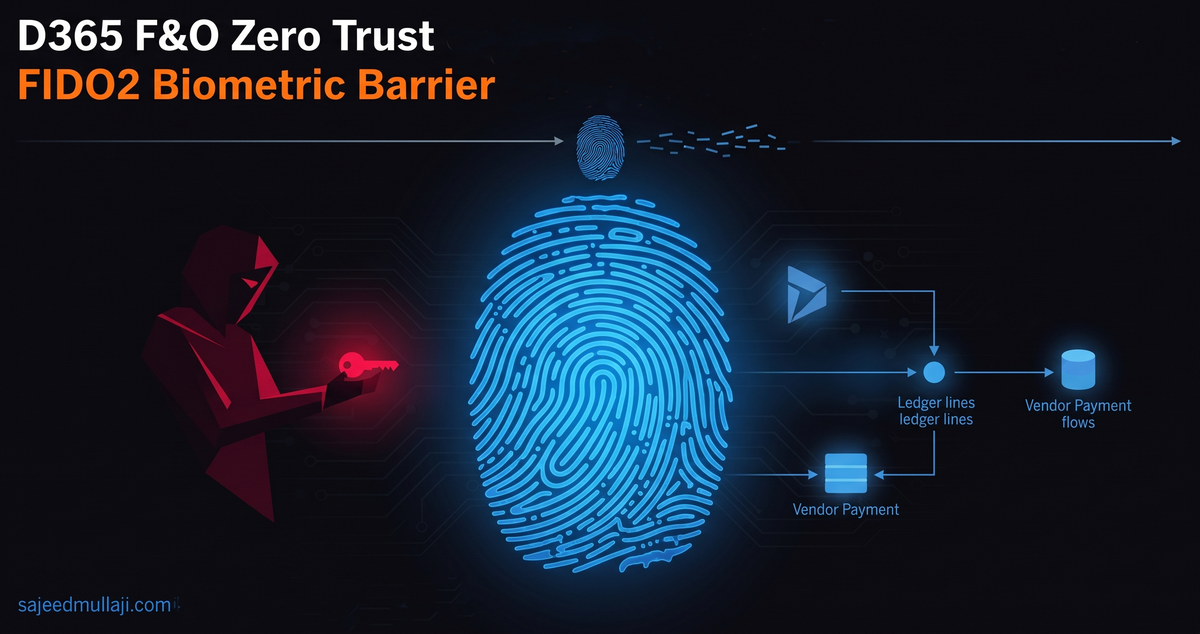
If an auditor walks into your finance department tomorrow and finds that standard user credentials can modify sensitive Segregation of Duties matrix overrides or release high value vendor payments without phishing resistant verification — you are looking at an immediate ITGC audit failure.
In enterprise ERP security — a compromised session token should not grant perpetual unmonitored access to your most critical financial ledgers.
This guide breaks down a fully configured production tested architecture combining Microsoft Entra ID Authentication Contexts and FIDO2 Passkeys — to enforce phishing resistant biometric step-up authentication the exact moment a user touches high risk financial data.
The Problem: Why Standard MFA Fails High-Risk ERP Workflows
At the foundation of any robust Dynamics 365 F&O security strategy is credential integrity.
Traditional multi-factor authentication using push notifications — SMS — or OTPs is no longer enough to stop modern adversary in the middle and session hijacking attacks.
The vulnerability lies in the scope of initial sign-in. A standard user session remains valid for hours. Inheriting a trusted token across a broad session grants perpetual unmonitored access to high privilege financial records once the initial barrier is cleared.
Cross Question 1 — A viewer will ask:
Aren't users already authenticating with standard MFA during initial sign-in — why force a secondary hardware layer at the application tier?
Because enterprise governance requires us to separate general productivity from high risk data modifications by introducing context-aware verification. Standard MFA protects the door — Authentication Contexts protect the vault.
The Solution: Decoupling Security from Applications via Authentication Contexts
Microsoft Entra ID allows us to decouple security controls from entire applications and bind them directly to granular business actions using Authentication Contexts.
Cross Question 2 — A Microsoft Partner will ask:
Does this require a custom application registration or code modification inside D365 F&O?
No. While Entra ID integrates natively with OData endpoints and Extensible Data Security queries — you can map these contexts directly to high risk SharePoint collaborative spaces — Power Platform administrative environments — or specific enterprise portal endpoints — without rewriting your core ERP logic.
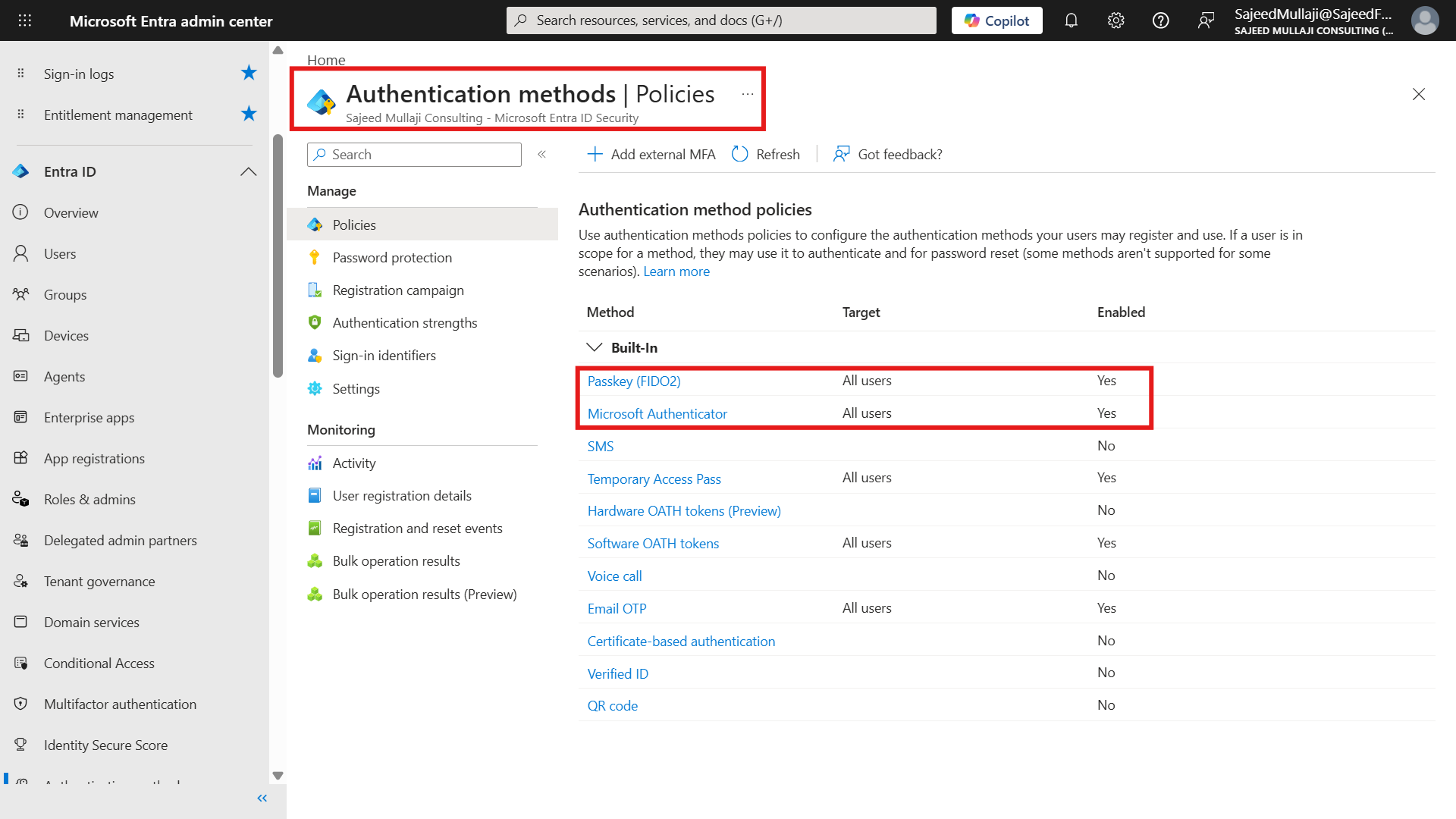
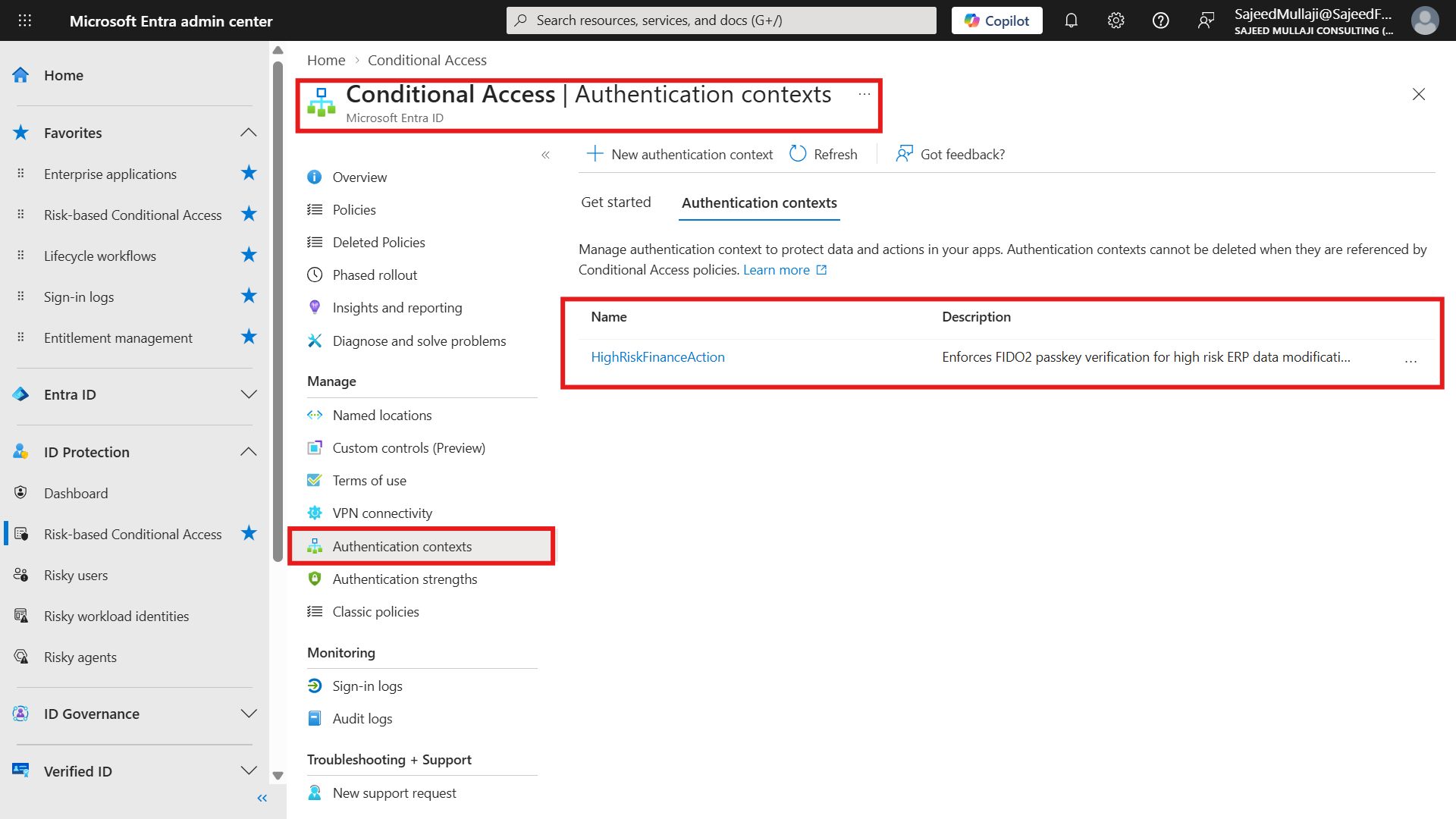
In our production tenant — we established the cryptographic baseline by ensuring FIDO2 Passkeys and Microsoft Authenticator are enabled tenant-wide under Authentication Methods — then created our custom authentication context named HighRiskFinanceAction with ID c1.
Complete Verified Configuration Steps
To replicate this architecture in your tenant — execute the following precise configuration sequence:
Step 1 — Enable FIDO2 Passkeys Tenant-Wide
- Open the Microsoft Entra admin center at entra.microsoft.com
- Navigate to Protection → Authentication methods → Policies
- Select Passkey FIDO2 — set status to Enabled — target All users — Save
Step 2 — Create the Custom Authentication Context
- Navigate to Protection → Conditional Access → Authentication contexts
- Click New authentication context
- Name: HighRiskFinanceAction
- Description: Enforces FIDO2 passkey verification for high risk ERP data modifications
- Note the assigned ID — c1 — Save
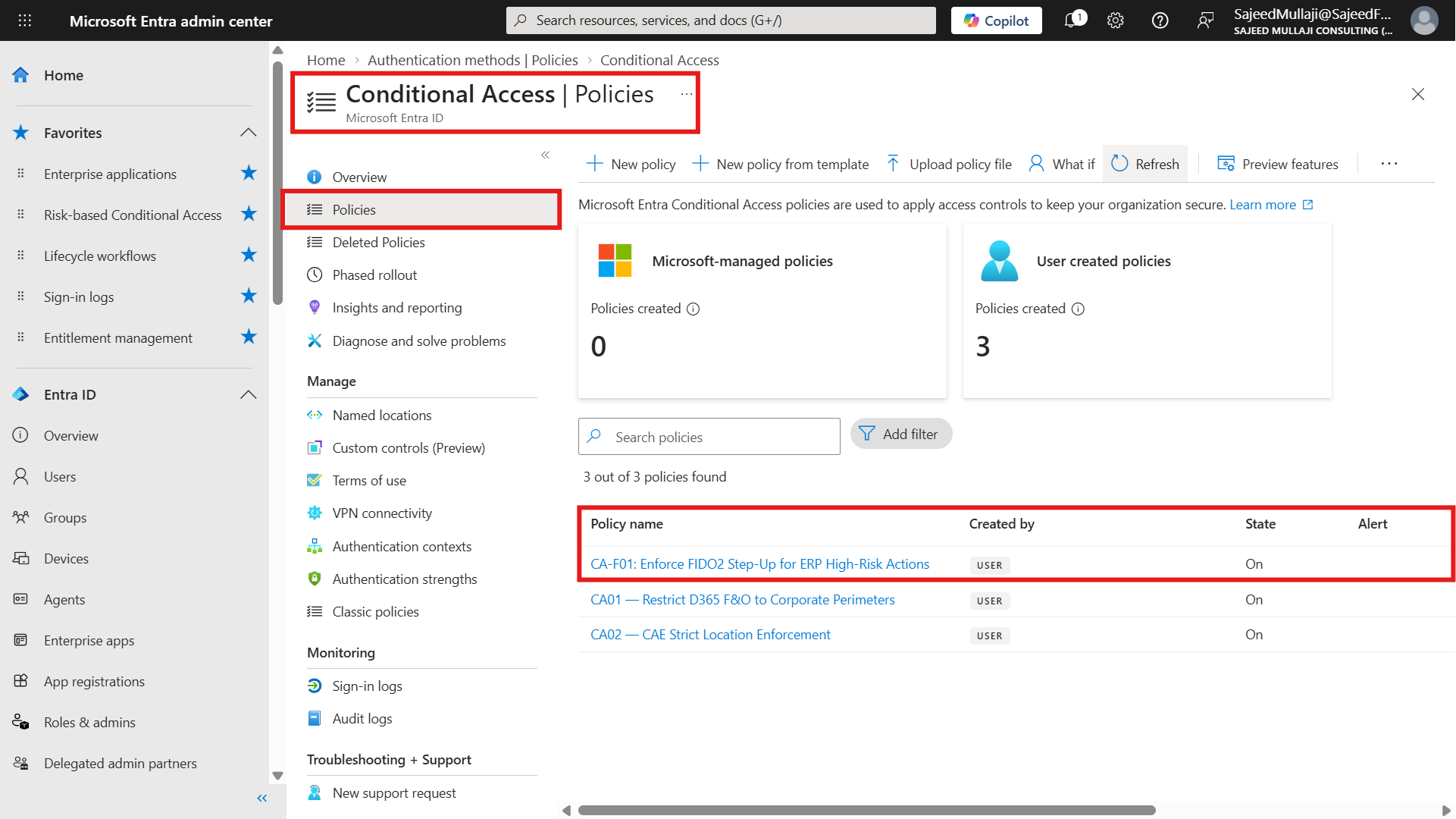
Step 3 — Configure Conditional Access Policy CA-F01
- Navigate to Protection → Conditional Access → Policies → New policy
- Name: CA-F01: Enforce FIDO2 Step-Up for ERP High-Risk Actions
- Users: Select your target user or test account
- Target Resources: Select Office 365 SharePoint Online
- Conditions: Select Authentication contexts → check HighRiskFinanceAction
- Grant: Grant access → Require phishing-resistant authentication — FIDO2 passkeys
- Enable policy: On → Save
Step 4 — Test the Live Kill Shot
- Ensure the test user has member permissions to the target SharePoint finance site
- Open a fresh InPrivate browser session to clear cached tokens
- Navigate to the high risk site URL
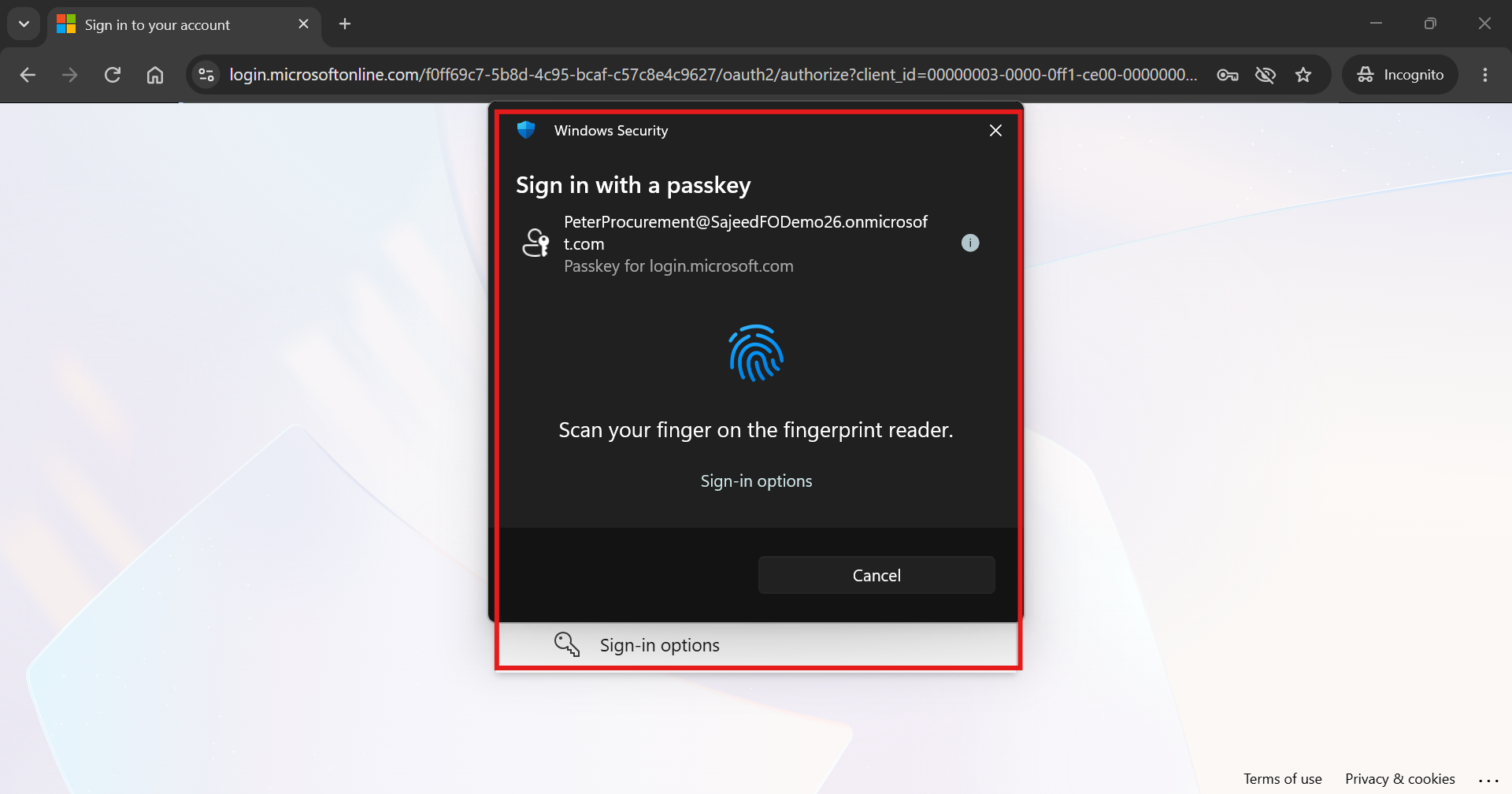
- Complete initial sign-in — the policy detects the HighRiskFinanceAction context — immediately triggers the Windows Hello biometric fingerprint prompt
Architectural Evidence: Verified Deployment
Cross Question 3 — An IT Audit Director will ask:
Can we not just use traditional session timeouts or location based Named Locations instead of authentication contexts?
Geofencing and timeouts are perimeter tools — they do not follow the data. If a CFO travels or logs in from a corporate network — a location policy still lets them modify sensitive tables. An authentication context evaluates the sensitivity of the action — regardless of where the user sits.
Advanced Roadmap: Expanding Beyond the Baseline
While what we have built today solves immediate audit requirements — this represents only the security baseline.
Microsoft Purview DLP Integration:
Automatically trigger authentication contexts and step-up requirements when sensitive financial classifications or PII exports are detected in collaborative documentation — adding an automated interception layer for data in motion.
Privileged Identity Management:
Automate emergency elevation workflows that require hardware bound biometric verification before granting temporary administrative rights to core ERP ledger environments — eliminating standing privileged access entirely.
ERP Form Level Step-Up:
Extend OData and API interceptors in D365 F&O to invoke Entra ID authentication contexts prior to posting journal entries — releasing payments — or overriding Segregation of Duties conflict matrices — bringing biometric governance inside the ERP itself.
Cross Question 4 — A CFO will ask:
What happens if the user's device does not have a hardware biometric sensor?
The policy automatically falls back to accepted hardware bound passkeys or security keys like YubiKeys — ensuring zero friction for authorized personnel while completely blocking software phishing vectors.
Cross Question 5 — A Security Architect will ask:
How does this impact daily operational latency for finance end users?
It adds less than two seconds to the transaction workflow — a negligible trade-off for eliminating multi-million dollar financial fraud risks.
Frequently Asked Questions
What is an Entra ID authentication context and how does it differ from a cloud app policy?
An authentication context allows you to apply Conditional Access controls to specific data items — actions — or granular workloads within an application rather than enforcing policies uniformly across the entire application session. This enables precision security where standard productivity remains frictionless but high risk data modification demands strict verification.
Why are FIDO2 passkeys considered phishing-resistant while standard MFA push notifications are not?
FIDO2 passkeys utilize public key cryptography bound securely to a specific hardware platform or security key. Because the cryptographic challenge response mechanism is tied to the origin domain — users cannot be tricked into approving fraudulent prompts via adversary in the middle phishing sites.
Does implementing authentication contexts require custom code changes in D365 F&O?
No core application code modifications are required. Authentication contexts integrate natively at the Microsoft Entra ID token issuance and application gateway layer — allowing enterprises to secure OData APIs — Power Platform workflows — and SharePoint repositories seamlessly.
What happens if a finance user attempts to access a protected resource from a device without biometric hardware?
If a user's workstation lacks a biometric sensor — the Entra ID authentication policy automatically falls back to accepted hardware bound FIDO2 security keys — ensuring seamless access for authorized personnel while maintaining compliance.
How does this architecture satisfy IT General Controls audit requirements?
ITGC frameworks require strict logical access controls — segregation of duties enforcement — and verifiable audit trails for financial systems. Implementing phishing resistant step-up authentication proves to auditors that high privilege transactional overrides cannot be executed via compromised credentials.
Governance is not about locking users out. It is about engineering friction precisely where the risk lives.
Visit sajeedmullaji.com