D365 F&O Vendor Payment Fraud — The Hit and Run Bank Account Attack and How to Expose It
The current system state looks clean. The routing number is correct. But two hours ago it pointed to a fraudulent account. Discover how Database Logging exposes the hit and run vendor payment fraud that leaves no visible trace.

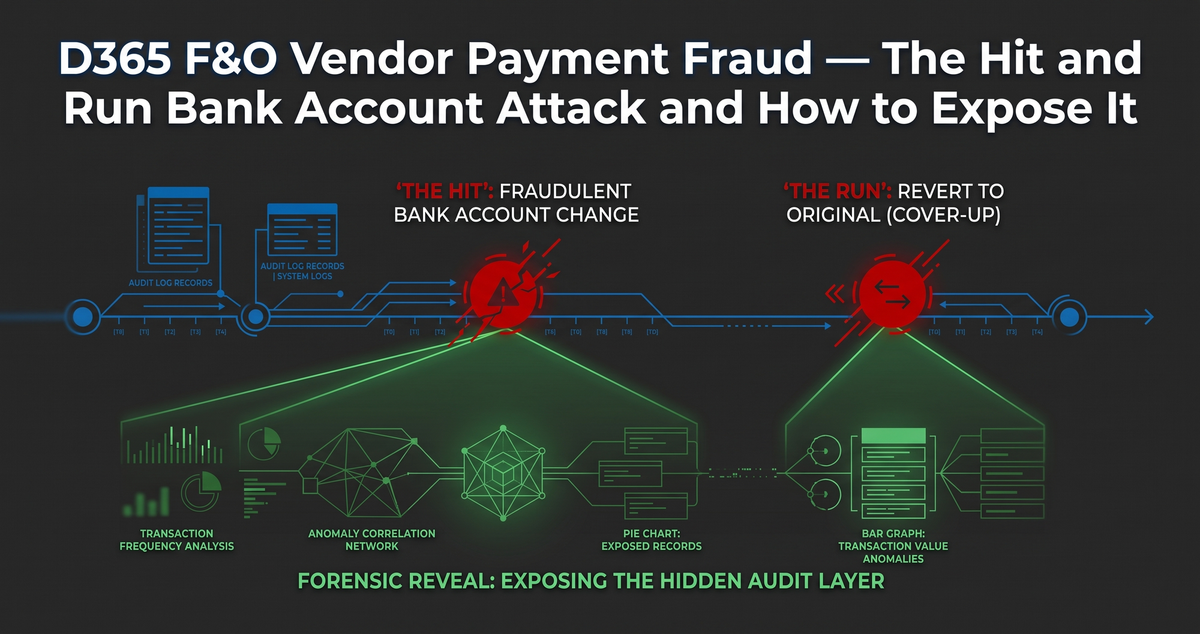
What happens when a trusted employee changes a vendor’s routing number, processes a massive payment to their own offshore account, and then changes the routing number back?
If the employee covers their tracks efficiently, your current system state will look perfectly clean.
An external auditor will pull up the vendor record, verify the routing number against the authorized bank letterhead, and find absolutely nothing out of place.
Millions of dollars can leave your organization, and your ERP will insist that everything is completely normal.
This is the nightmare scenario for any CFO. It is known as the hit-and-run bank account attack.
Today, we are going to dissect exactly how this attack happens inside Dynamics 365. More importantly, we are going to build the D365 F&O forensic audit trail required to expose it.
Mastering D365 F&O vendor payment fraud prevention requires moving beyond simple business processes and deploying irreversible system controls.
Here is exactly how the crime is committed, how the cover-up works, and how your IT Audit team can trap the fraudster.
Step 1: The Crime (The Fraudulent Change)
The attack begins with an insider who already holds the security privileges required to modify master data.
The rogue employee navigates to Accounts payable, opens All vendors, selects a high-volume vendor, and clicks into Bank accounts.
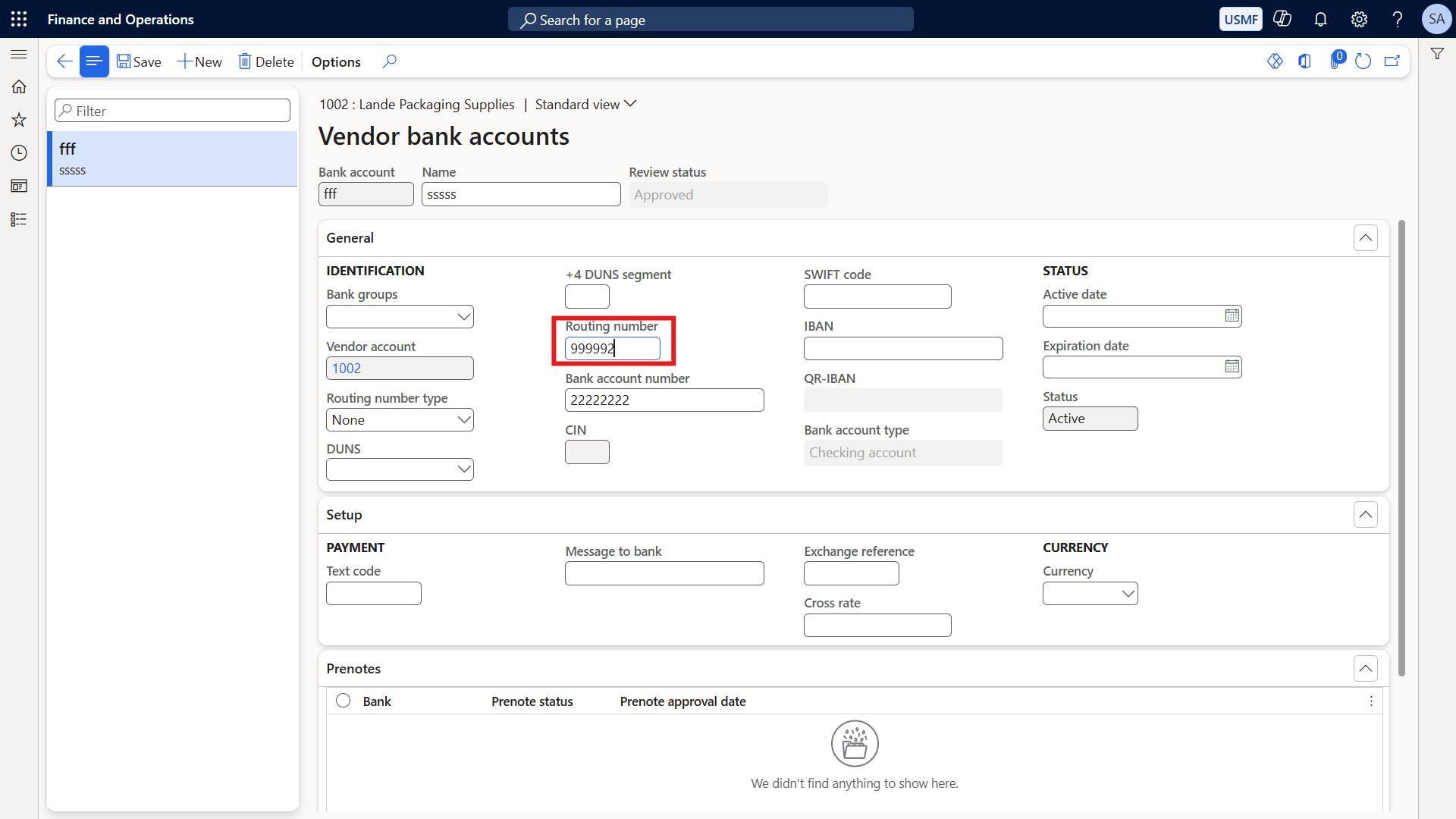
They click Edit and delete the legitimate routing number.
In its place, they input a fraudulent routing number tied to a personal or offshore account they control. They hit Save.
The trap is now set. The ERP system fully believes this new routing number is the correct destination for the next payment run.
Because the employee has legitimate access, this action does not immediately trigger standard system errors. The master data has simply been updated.
Step 2: The Cover-Up (Erasing the Footprints)
Once the fraudulent routing number is saved, the standard payment journal process occurs.
Hundreds of thousands of dollars are routed directly to the fraudulent account.
The exact moment the cash clears the building, the rogue employee initiates the cover-up phase.
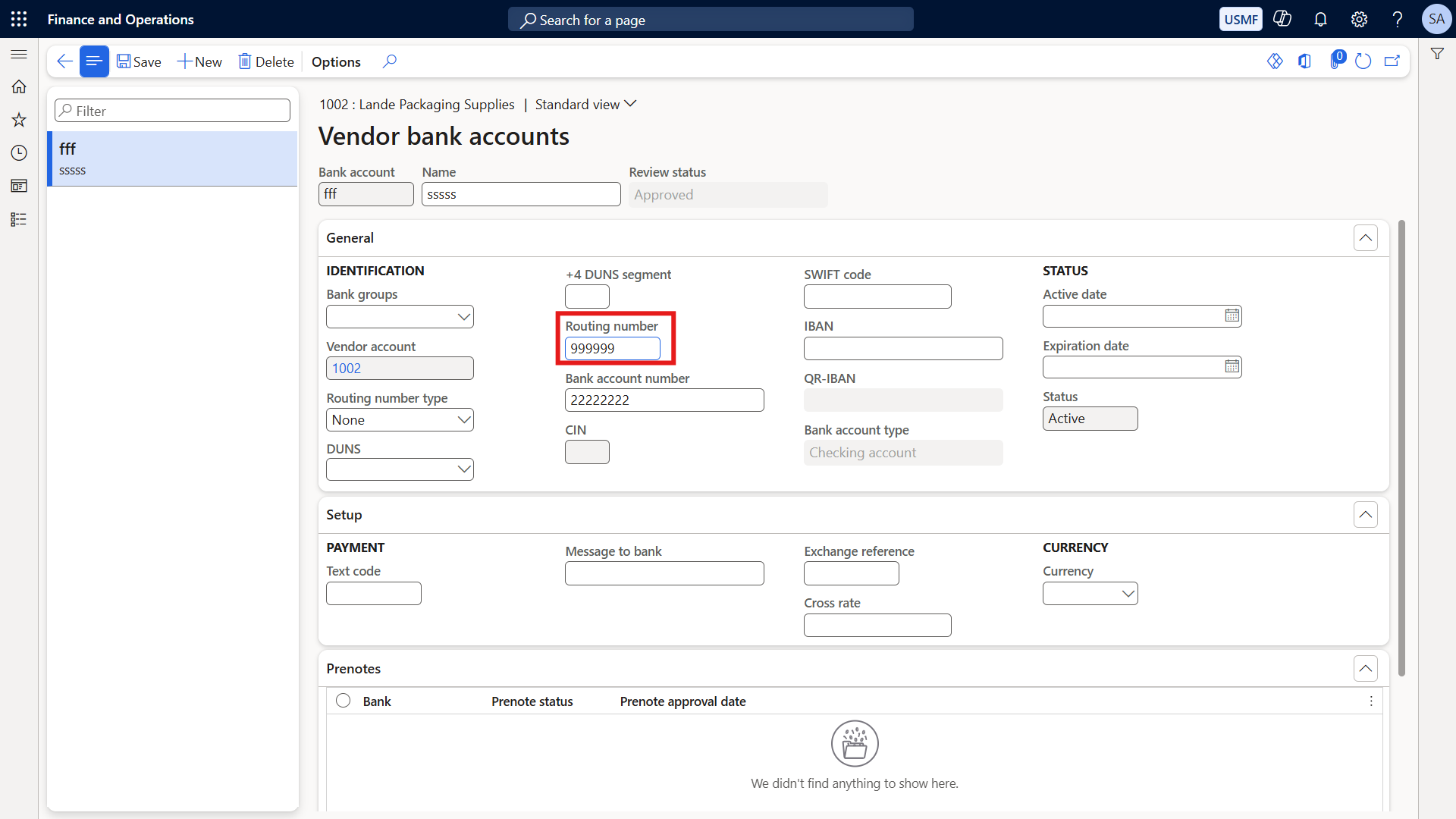
They navigate right back to the exact same vendor bank account screen.
They hit Edit, delete their fraudulent routing number, and type the original, legitimate routing number back into the system. They hit Save and walk away.
The current system state now shows the correct bank account. The fraudulent entry no longer exists on the live record.
When your ITGC auditors arrive and sample this vendor, they will see a completely clean record. They will find nothing wrong.
The Auditor’s Blind Spot: Why Written Approvals Fail
This specific scenario highlights the most dangerous blind spot in corporate governance.
When CFOs see this attack modeled, they almost always ask a critical question:
Cross question: Why not just require written approval from a senior person before any bank change?
Answer: Written approvals are a business process control. D365 database logging is a system control. You desperately need both to survive an audit.
The physical or emailed approval authorizes the change to happen in the real world.
The system log provides the undeniable forensic proof that the digital change matched exactly what was approved on paper.
More importantly, the system log catches the ghost changes—the modifications made quietly in the background without any written approval at all.
Relying solely on paper approvals leaves you completely blind to unauthorized digital manipulation.
Step 3: The Reveal (Exposing the Hit and Run)
To catch this fraud, we must look past the current system state and examine the hidden historical layer.
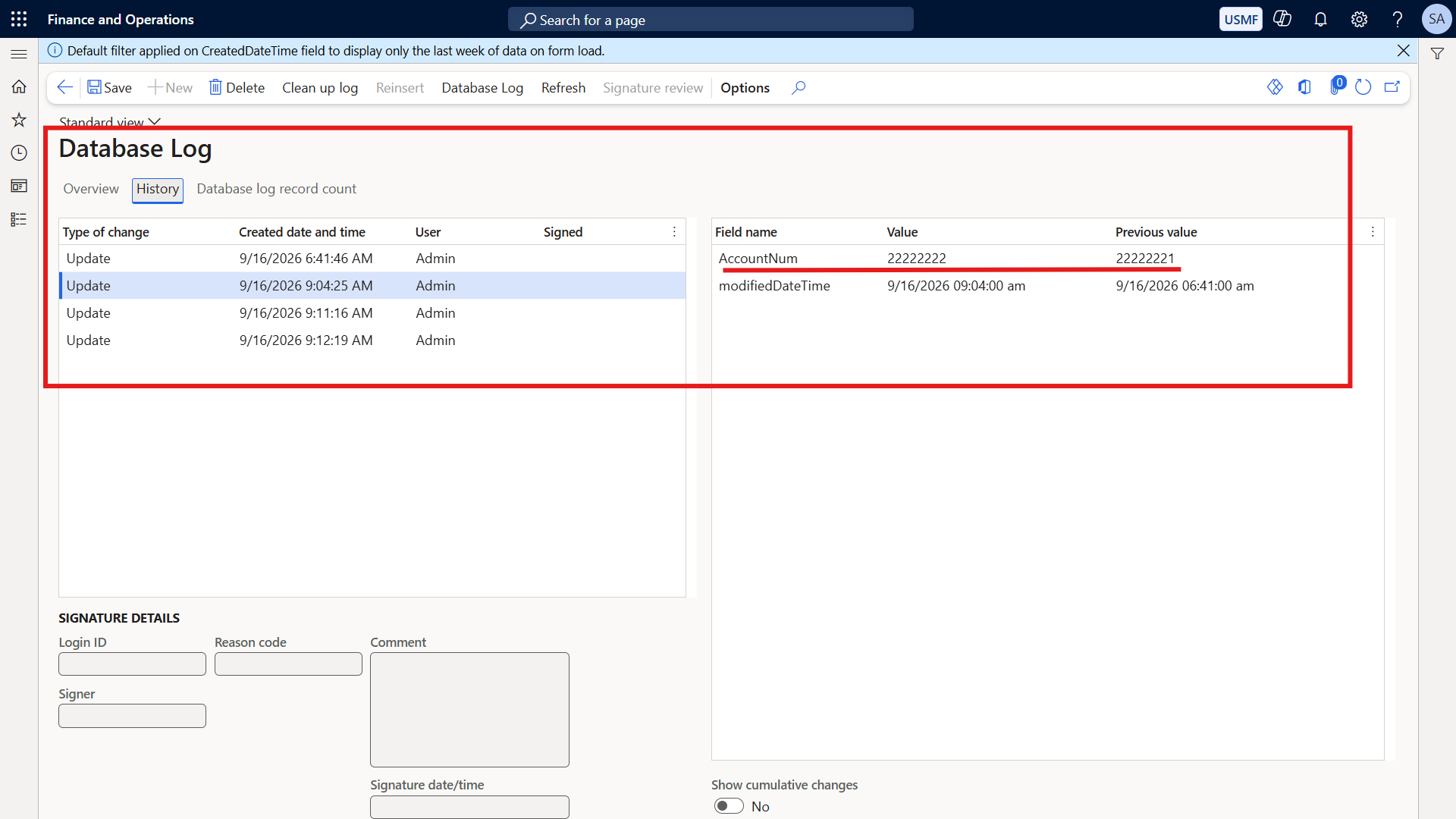
We navigate to System administration, move down to Inquiries, and open the Database log.
We filter the log specifically for the VendBankAccount table. This is our unerasable forensic truth.
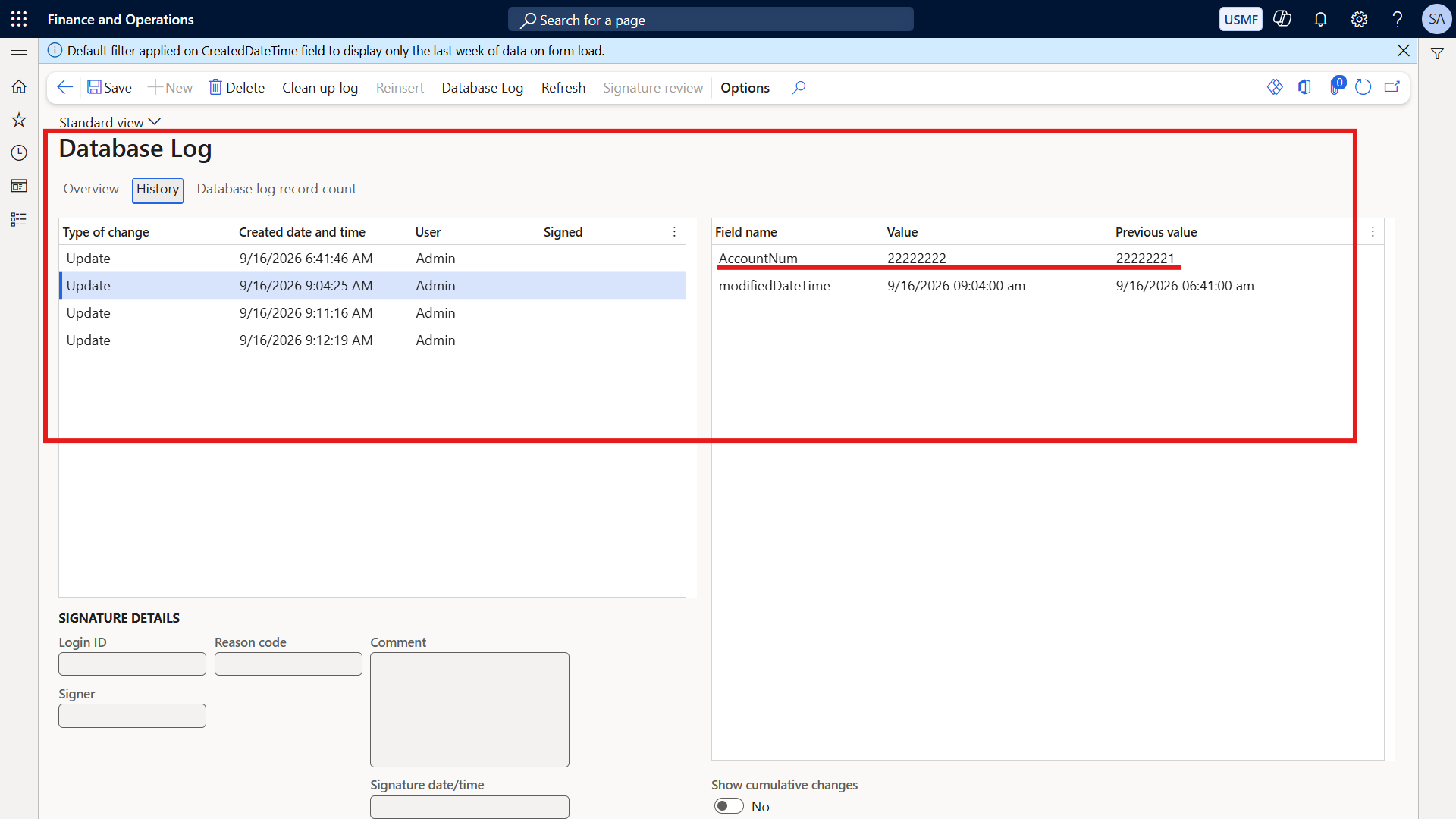
The complete timeline is laid bare on the screen. The grid exposes every single action chronologically.
Entry 1 shows the exact timestamp the routing number was changed to the fraudulent account.
Entry 2 shows the exact timestamp, just hours later, when the routing number was changed back to the original.
The log captures the rogue user’s ID, the exact old value, and the exact new value for every single transaction.
This is the D365 F&O forensic audit trail. It survives the cover-up and provides undeniable proof of the crime.
Step 4: Configuring the Forensic Audit Trail
To capture this level of detail, you must configure your environment perfectly.
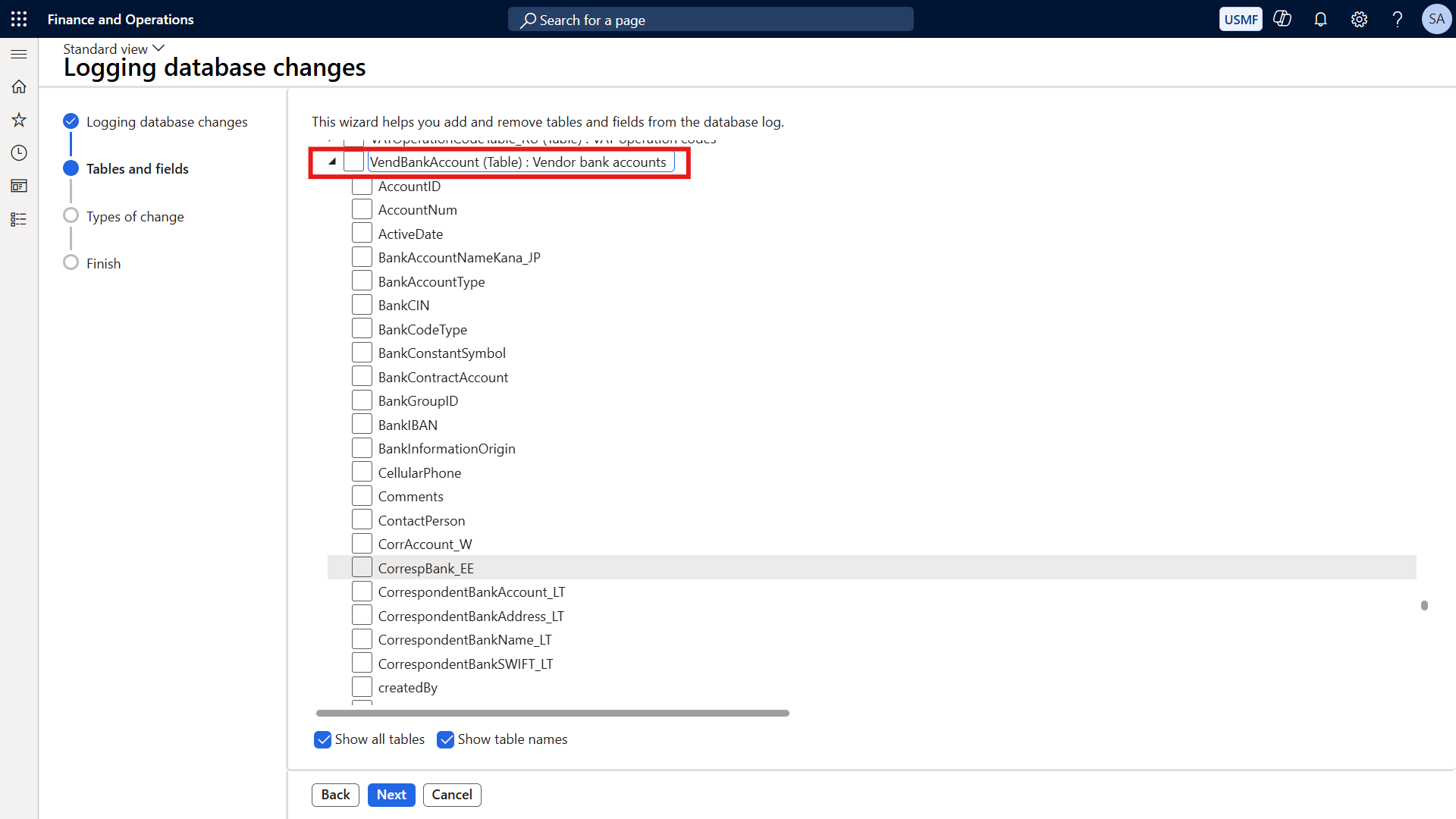
Navigate to System administration, go to Setup, and open the Database log setup wizard.
When configuring D365 VendBankAccount logging, you will be presented with a list of individual fields like AccountNum and RoutingNumber.
Do not select individual fields. You must select the entire parent table.
If you only track a specific field, the system will only capture 'Updates' to existing records.
By selecting the entire table, you force the system to track Inserts, Updates, and Deletes.
This ensures you catch a fraudster who tries to create a brand new ghost bank account or delete one entirely to hide their tracks.
The Cleanup Batch Job Requirement
As you proceed through the wizard, you will notice the system blocks you from clicking the final Finish button.
This is an intentional, hardcoded safety mechanism designed to enforce good governance.
The system will not allow you to activate logging until you schedule a native cleanup batch job.
This prevents SQL database bloat. If logs are left to accumulate forever, your environment will eventually crash.
You must exit the wizard, schedule the background cleanup job to manage the data lifecycle, and then the system will unlock the Finish button.
Addressing C-Suite Performance Concerns
When deploying heavy system controls, IT architecture teams immediately raise valid infrastructure concerns.
Cross question: Will database logging fill up the system and slow it down?
Answer: Yes, if configured poorly. D365 database logging executes synchronously, meaning it writes the log before the user can proceed.
The golden rule of D365 governance is to only log critical master data tables and security configurations. You must never log transactional tables like sales orders.
Keep 90 to 180 days of logs live in D365. You then archive the historical data to an Azure Data Lake for your 7-year SOX retention.
Because a vendor's bank account is not updated thousands of times a day, the performance impact on the VendBankAccount table is entirely negligible.
Navigating SOX and ITGC Compliance
External auditors expect rigorous data retention strategies for financial master data.
Cross question: How long should we retain database logs for SOX and ITGC compliance?
Answer: SOX and external auditors typically require retaining financial audit trails for 1 to 7 years, depending entirely on your specific legal jurisdiction.
As established, keeping 7 years of logs live inside your transactional ERP database is a technical disaster.
The architectural best practice is keeping 90 to 180 days live in D365, while archiving the rest to an Azure Data Lake via Synapse Link or Fabric.
This allows your external auditors to query 7 years of deep forensic D365 F&O change tracking SOX data using Power BI, without ever touching your live ERP performance.
Proactive Defense: Layering Complementary Controls
Database logging is the ultimate detective control—it finds the body after the crime is committed.
To build world-class D365 vendor bank account security, you must layer preventative controls on top of it.
First, implement strict Role Engineering to physically restrict which users have the security access required to even see the edit button.
Second, deploy the native Vendor Approval Workflow. This hard-blocks any routing number change from taking effect until an authorized manager approves it in the system.
Third, mandate Electronic Signatures for bank account modifications.
Even if a user leaves their computer unlocked, an electronic signature forces them to re-authenticate with a password and a reason code before the change is accepted.
Finally, for production environments, configure real-time alerts.
Use Power Automate and Business Events to instantly ping your IT Security channel in Microsoft Teams the exact millisecond a bank account is modified.
Securing Your Master Data
The most dangerous scenario in enterprise ERP is a system state that looks perfectly clean while hiding a catastrophic breach.
Workflows prevent the crime. Alerts notify you of the attempt. But database logging is your black box flight recorder.
It is the only absolute protection against hit-and-run frauds that successfully bypass your human business processes.
For a complete breakdown of building an unbreakable ERP security architecture, explore our full series at sajeedmullaji.com/tag/d365-governance-roadmap.
If you are looking for standardized security matrices and audit frameworks to accelerate your compliance journey, you can download them directly at sajeedmullaji.com/tag/templates.
To protect your organization from master data manipulation and ensure your next ITGC audit is flawless, visit sajeedmullaji.com to secure your environment today.
Executive Q&A: IT Audit & Forensic Governance
Q: If a fraudster has System Administrator rights, can they simply delete the Database Log entries to erase their forensic footprints?
Yes. System Administrators have unrestricted access to the SQL backend and the sysdatabaselog table. This is exactly why ITGC frameworks mandate that no daily operational user—including the CFO or lead developers—should hold the System Administrator role in a live production environment. If a SysAdmin commits the fraud, your only recourse is querying the Azure Data Lake archive or the Microsoft telemetry logs, provided the data was exported before they purged the local table.
Q: Does tracking the entire VendBankAccount table instead of specific fields increase the risk of locking the table and causing deadlocks during payment runs?
Tracking the entire table does increase the synchronous write payload slightly, but it does not cause deadlocks during payment runs. The payment journal process primarily reads from the VendBankAccount table; it does not write to it. The locking risk only occurs when multiple users attempt to edit the exact same vendor bank master record simultaneously, which is an exceptionally rare business scenario. The forensic value of capturing unauthorized 'Inserts' far outweighs the negligible performance overhead.
Q: If we use a third-party AP automation ISV to process invoices and update vendor data, will native D365 database logging still capture those API-driven changes?
Yes, but it depends on the integration architecture. If the ISV uses standard OData endpoints or Data Entities to push updates into D365, the database log will capture the change. However, the 'User ID' recorded in the log will likely be the generic Service Account or App Registration used by the integration, not the physical human who made the change in the third-party software. You must ensure your ISV platform has its own internal audit trail to map that Service Account action back to the physical user.