Secure D365 F&O Data Exports — Microsoft Purview Encryption vs Google Drive
Prevent unmanaged data exfiltration from Dynamics 365 F&O by enforcing persistent file level encryption using Microsoft Purview. Learn how sensitive Excel exports remain secure against unauthorized cloud storage.

When a finance user hits Open in Excel on a sensitive general ledger or vendor master grid inside Dynamics 365 Finance and Operations — the data leaves the ERP perimeter instantly.
That exported spreadsheet — containing unprotected bank account details, salary bands, and margin structures — can now be saved to a personal laptop, emailed to a rogue external address, or uploaded to an unmanaged Google Drive account.
In the GCC, UK, and India, failing to control that exported file triggers immediate regulatory violations under the GDPR, the DPDP Act, and DIFC data protection laws — exposing enterprises to statutory fines reaching 4% of global turnover and automatic failure during IT General Controls audits.
The Problem: Why RBAC Is Not Enough Once Data Leaves D365
Role Based Access Control and Segregation of Duties are the cornerstones of Dynamics 365 F&O security. They dictate who can view, create, or modify records inside the database and application interface.
But RBAC stops at the application boundary.
Once an authorized user extracts data via standard export routines — ERP level security vanishes. The file becomes an autonomous asset on a local endpoint. Database logging ceases. Internal audit trails go blind.
Relying solely on D365 perimeter controls while ignoring downstream data exfiltration leaves a massive vulnerability that internal and external auditors flag immediately.
Cross Question 1 — An IT Audit Director will ask:
Does D365 Role Based Access Control not already stop unauthorized people from getting this data?
RBAC secures the ERP perimeter. But the moment data is exported to Excel by a legitimate user — ERP boundaries disappear. Perimeter security ends where file centric security must begin.
The Solution: How Microsoft Purview Sensitivity Labels Work
Microsoft Purview Information Protection shifts the security paradigm from network perimeters to file centric encryption. By applying sensitivity labels — organizations embed persistent protection directly into the file's binary structure.
Label Hierarchy
Standard Microsoft 365 tenants deploy a baseline taxonomy which organizations customize to meet exact compliance frameworks:
Public — Unrestricted internal and external distribution
General — Standard internal business operations data
Confidential — Restricted to internal employees and vetted contractors
Highly Confidential — Locked down to named individuals or specific administrative groups such as Finance Only or Board Restricted
Custom labels can be created for any specific organizational requirement — HR Confidential, Board Restricted, Vendor Data Only — each with its own encryption rules, access restrictions, and watermarking policies.
Cross Question 2 — A Microsoft Partner will ask:
Why use manual desktop labeling here instead of waiting for auto-labeling policies?
Auto-labeling rules run via background cloud indexing queues — introducing latency. Manual application ensures immediate deterministic protection — the moment the file is saved it is encrypted.
Configuration Guide: Verified Steps
Phase 1 — Creating the Sensitivity Label in Purview
- Navigate to the Microsoft Purview compliance portal at compliance.microsoft.com
- Go to Information protection → Labels → Create a label
- Name the label — example: Highly Confidential Finance Only
- Assign a display name and tooltip describing the label purpose
- Enable Files and emails scope
- Under encryption settings — select Assign permissions now
- Add specific authorized users or security groups
- Save and publish the label via a Label Policy targeted to your finance and accounting security groups
Phase 2 — Executing the Workflow
Step 1 — Export:
Extract live financial data from D365 F&O using standard grid actions — Open in Excel
Step 2 — Protect:
Open the file in Excel desktop — click Sensitivity in the Home ribbon — apply the Specified People Highly Confidential label
Step 3 — Enforce:
Upload the file to an unauthorized repository like Google Drive to verify the block
The Live Demonstration
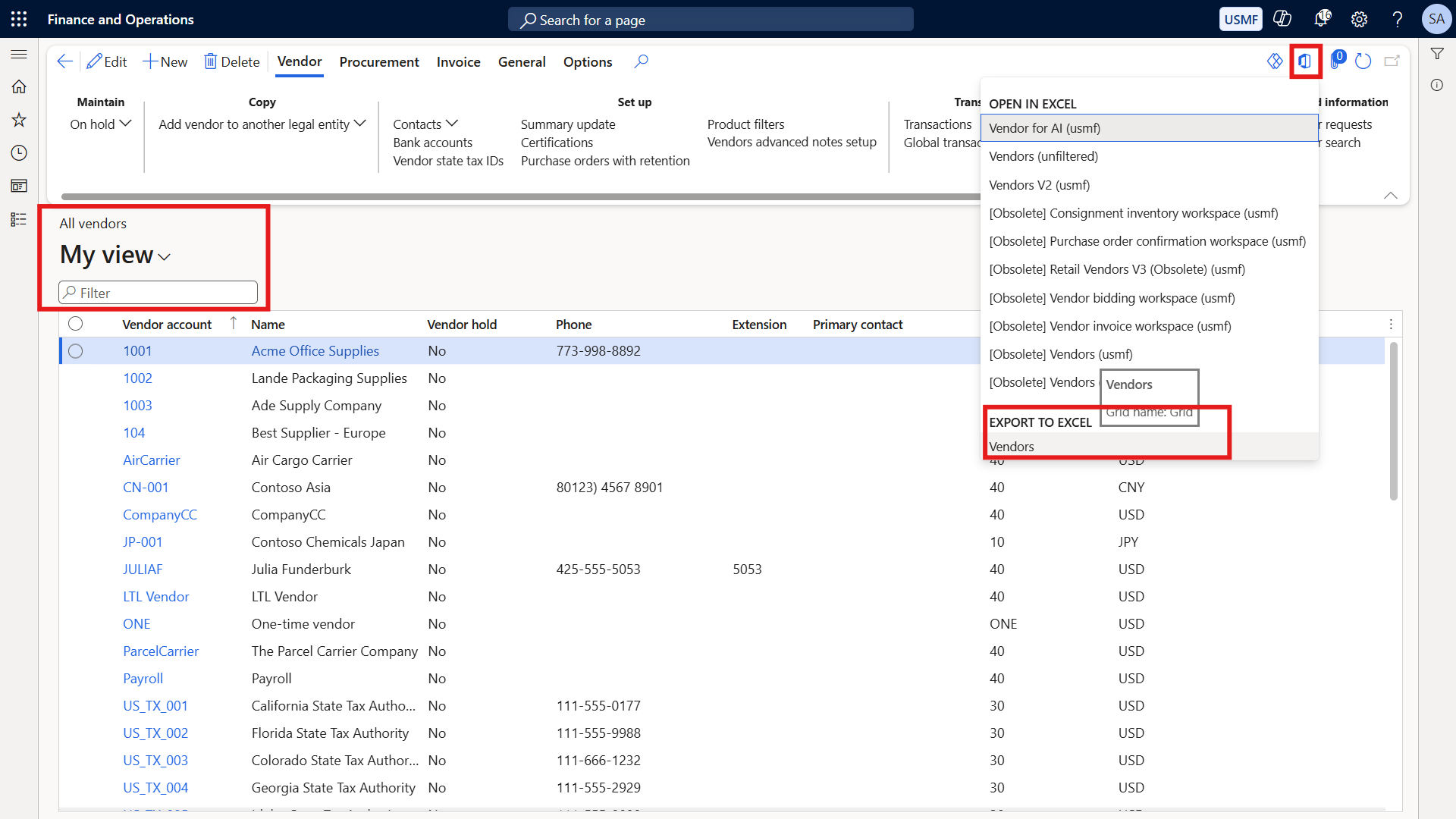
Step 1: Extracting live ERP data via standard D365 Open in Excel — sensitive vendor and financial records leaving the ERP perimeter.
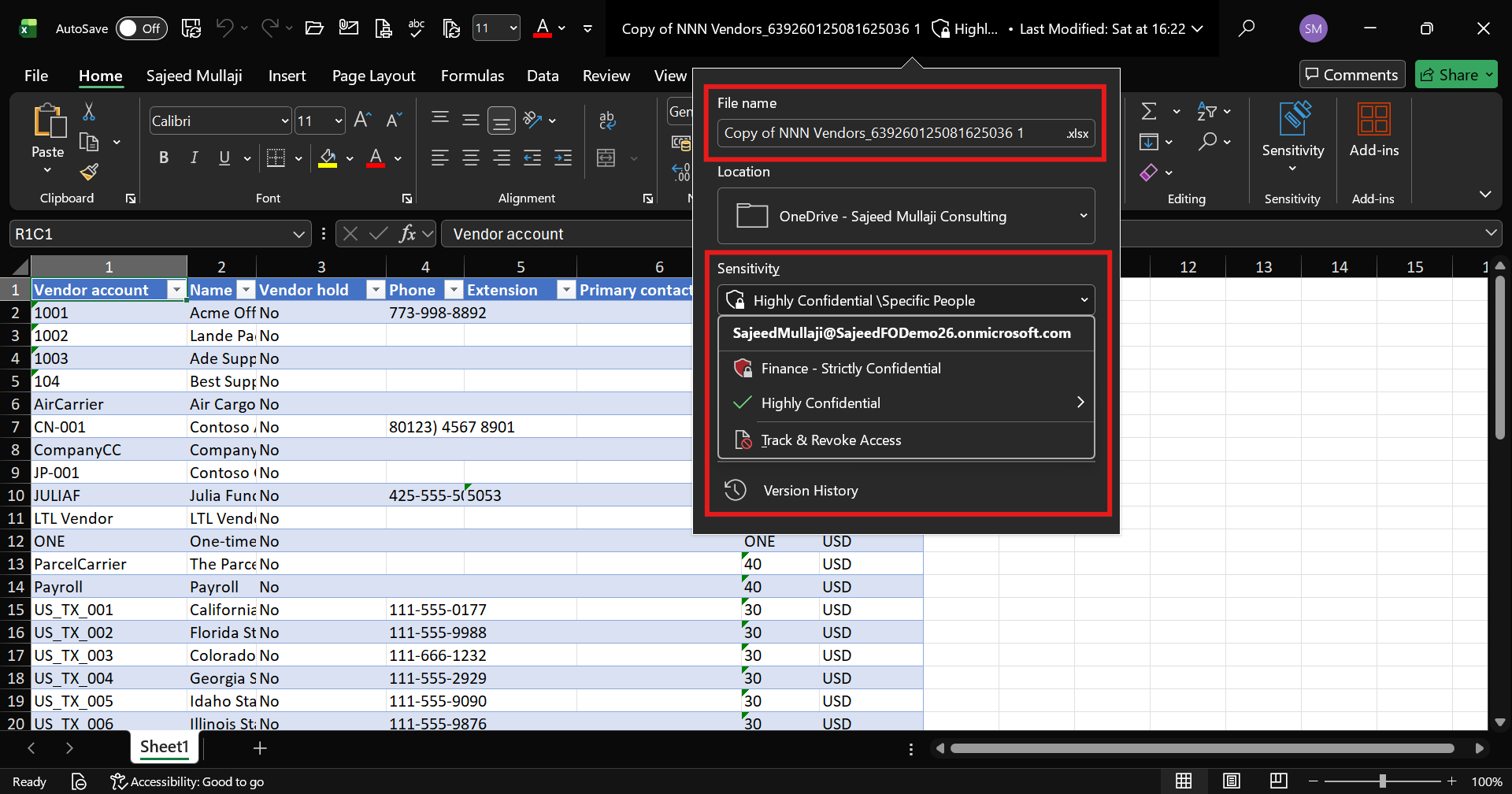
Step 2: Enforcing persistent file level encryption directly inside Excel desktop — Specified People Highly Confidential label applied — cryptographic protection embedded into the binary structure.

Step 3: Instant block when unmanaged cloud storage attempts to read encrypted data — conversion failed — Google Drive cannot read a single byte.
Cross Question 3 — A CFO will ask:
Can a user not just rename the file extension or strip the metadata to bypass this protection?
Absolutely not. The encryption is bound directly to the file's binary structure via Microsoft Information Rights Management. Changing the extension — moving the file — copying it — none of that works. The file is completely useless without the cryptographic key tied to the authorized Entra ID identity.
The Proof: Google Drive Blocked vs Seamless Local Access
When the labeled file is introduced to an unauthorized environment like Google Drive — the platform attempts to parse and convert the spreadsheet into its native web format.
Because Google Drive lacks the cryptographic keys authorized by your Microsoft Entra ID tenant — the decryption fails entirely — resulting in a hard block.
Conversely — when an authorized user opens that exact file locally on a managed endpoint — Microsoft 365 transparently verifies their identity and grants instant access. Zero friction. Complete security.
Cross Question 4 — A Security Architect will ask:
What happens if an authorized employee leaves the organization next week — can they still open files they previously downloaded?
No. Because decryption rights are managed centrally through Entra ID and the Purview compliance portal — revoking their account instantly renders every previously downloaded file permanently unreadable. The encryption follows the identity — not the file location.
Purview Roadmap: Expanding Beyond File Labels
While file level labeling solves the immediate export risk — a mature enterprise architecture incorporates broader Microsoft 365 governance capabilities.
Data Loss Prevention
DLP policies monitor data in motion across Exchange Online, SharePoint, and OneDrive. They actively scan outbound emails and file shares for financial patterns such as bank routing numbers or credit card data — and block transmissions before they occur. For D365 F&O environments — DLP adds an automated interception layer for sensitive financial data moving through email or collaboration platforms.
Microsoft Purview Audit
Comprehensive logging tracks every administrative modification, file download, search query, and label change across the tenant. This provides the exact chronological telemetry required by IT auditors during annual SOC 2 or ISO 27001 assessments — proving that every access attempt was monitored and recorded.
Container Level Sensitivity Labels
Instead of protecting individual files — container labels protect entire SharePoint sites, Microsoft Teams channels, and Microsoft 365 Groups. They enforce automated rules regarding guest access restrictions, unmanaged device synchronization, and external sharing boundaries — providing governance at the collaboration infrastructure level.
Cross Question 5 — An IT Audit Director will ask:
Is file level labeling enough to satisfy an enterprise IT audit?
It forms an exceptional baseline — but a bulletproof audit posture requires combining file level protection with automated DLP rules and container level SharePoint governance for holistic coverage.
Frequently Asked Questions
Does Microsoft Purview encryption work on non-Microsoft platforms like Google Workspace or macOS?
Purview protected files can be viewed on macOS and mobile devices using native Microsoft 365 applications that support Information Rights Management. However unauthorized web platforms like Google Drive cannot parse the encrypted binary structure — rendering the files completely inaccessible.
What licensing tier is required to use Purview sensitivity labels with encryption?
Basic classification requires Microsoft 365 E3. Automated labeling, advanced encryption rules, and granular Purview compliance solutions typically require Microsoft 365 E5 or Compliance F5 and E5 add-on licensing.
Can D365 F&O automatically apply sensitivity labels to exports?
Manual application ensures immediate tactical control. Advanced integration can leverage automated sensitivity labeling policies configured within the Microsoft Purview compliance center to scan and classify files upon download — removing the dependency on end user action.
How does this impact internal ITGC compliance reviews?
Information Protection directly addresses IT General Controls concerning data change management, logical access security, and confidentiality — providing auditors with demonstrable proof that financial exports are cryptographically secured beyond the ERP boundary.
What happens if a user loses internet connection while working on a labeled file?
Purview supports offline licensing policies. Once an authorized user authenticates against Entra ID — a cached offline license allows them to open and edit protected files for a configurable period without active connectivity.